العربية
See pricing
العربية
See pricing

Retail operations, one system

Everything your business needs, in one place.

Orders, stock, cash, staff, suppliers and your online store — one database, one login, in Arabic or English. Built for businesses that actually have to close the drawer at the end of the night.

  • No setup fee
  • Works offline
  • Arabic and English
  • Cancel any time
The Joey Cash dashboard: today’s revenue and profit, a sales trend chart, orders broken down by status and source, and the most recent orders.
  • 14

    connected workspaces

    Orders, stock, cash, people, customers, partners, storefront — not seven apps stitched together.

  • 0

    orders lost offline

    The till keeps taking orders with no internet and reconciles them, server-checked, when the line comes back.

  • 2

    languages, fully mirrored

    Arabic and English with real right-to-left layout — not an English screen with translated labels.

  • 1

    database behind everything

    Your counter and your online store read the same stock. A sale in one is visible in the other immediately.

Why businesses replace what they have

The four things that quietly cost you money

None of these show up as a line on a report. They show up as a number at the end of the month that does not match what you remember selling.

  • Cash you cannot reconcile

    Money arrives as cash, Instapay, wallet transfers and cheques, across shifts and branches. By closing time nobody can say what should be in the drawer, so nobody checks.

    A blind end-of-day count against a ledger the system already knows the answer to.

  • Stock you cannot trust

    The count on screen stopped matching the shelf months ago. So staff stop reading it, start guessing, and you buy things you already have.

    Counted sessions, movement history per item, and a reorder view that says what to buy and from whom.

  • Work you cannot verify

    Who took that order, who approved the discount, who moved stock between branches, who was actually on shift. All of it lives in someone’s memory.

    Every action is logged against a person, in the reader’s own language.

  • Orders that fall through

    A customer messages on Instagram, a courier takes six pieces, a workshop has three more, and one order quietly stops moving for nine days.

    One pipeline with delivery dates, stale-order alerts and courier settlement built in.

The product

Six surfaces that do the actual work

These are real screens with real data, not illustrations. Scroll to move through them.

Orders

From “can I get one of these” to delivered

Take an order at the counter in seconds, or build a detailed one with customisations, workshop work and part payment. Every order lands in one pipeline you can filter six ways.

  • Quick Order on F2 for sales that finish on the spot — nothing left to track
  • Delivery dates with urgent, due and overdue flagged automatically
  • Pay-later balances tracked per customer, not on a sticky note
  • Orders taken offline are queued and server-checked on reconnect
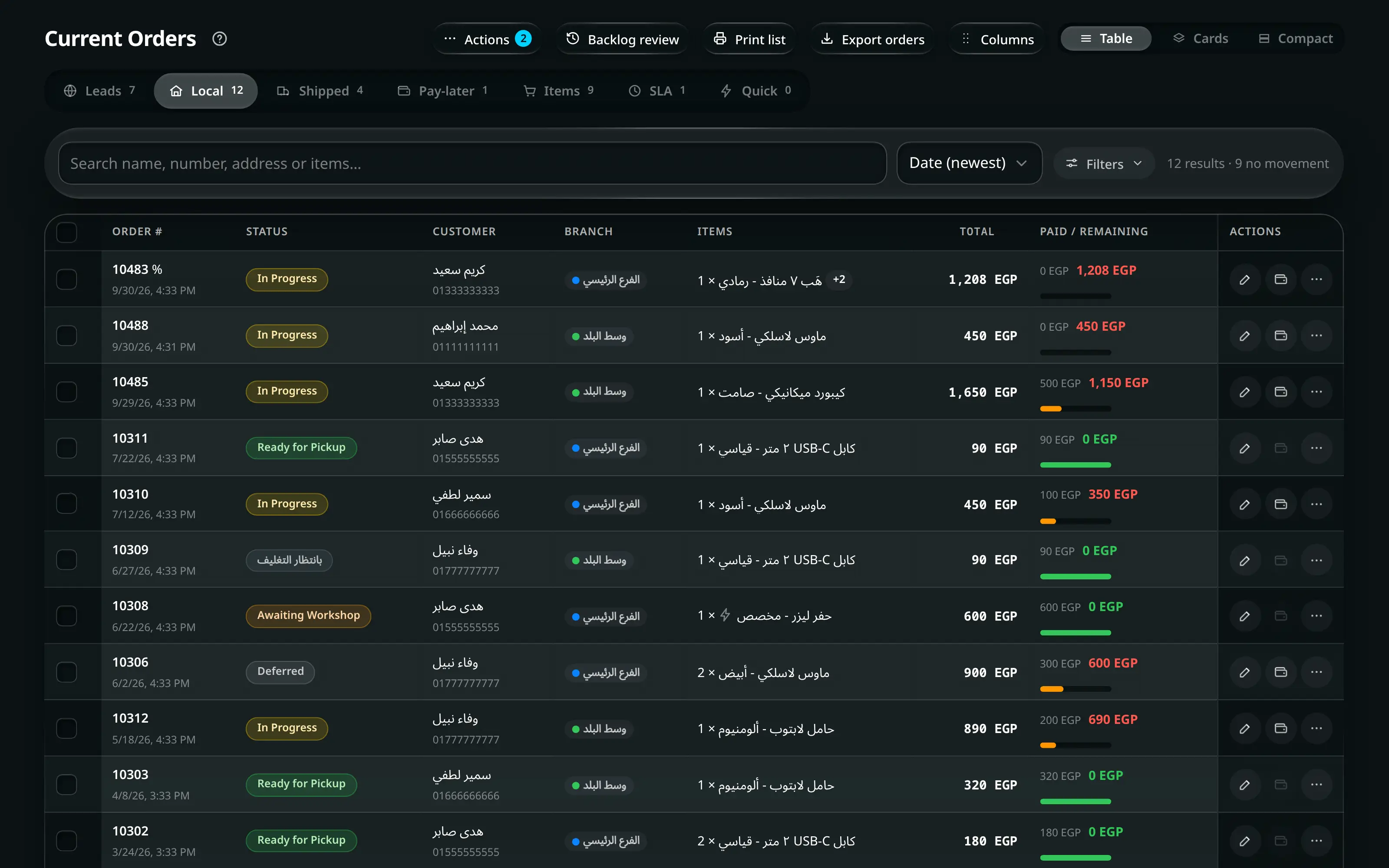
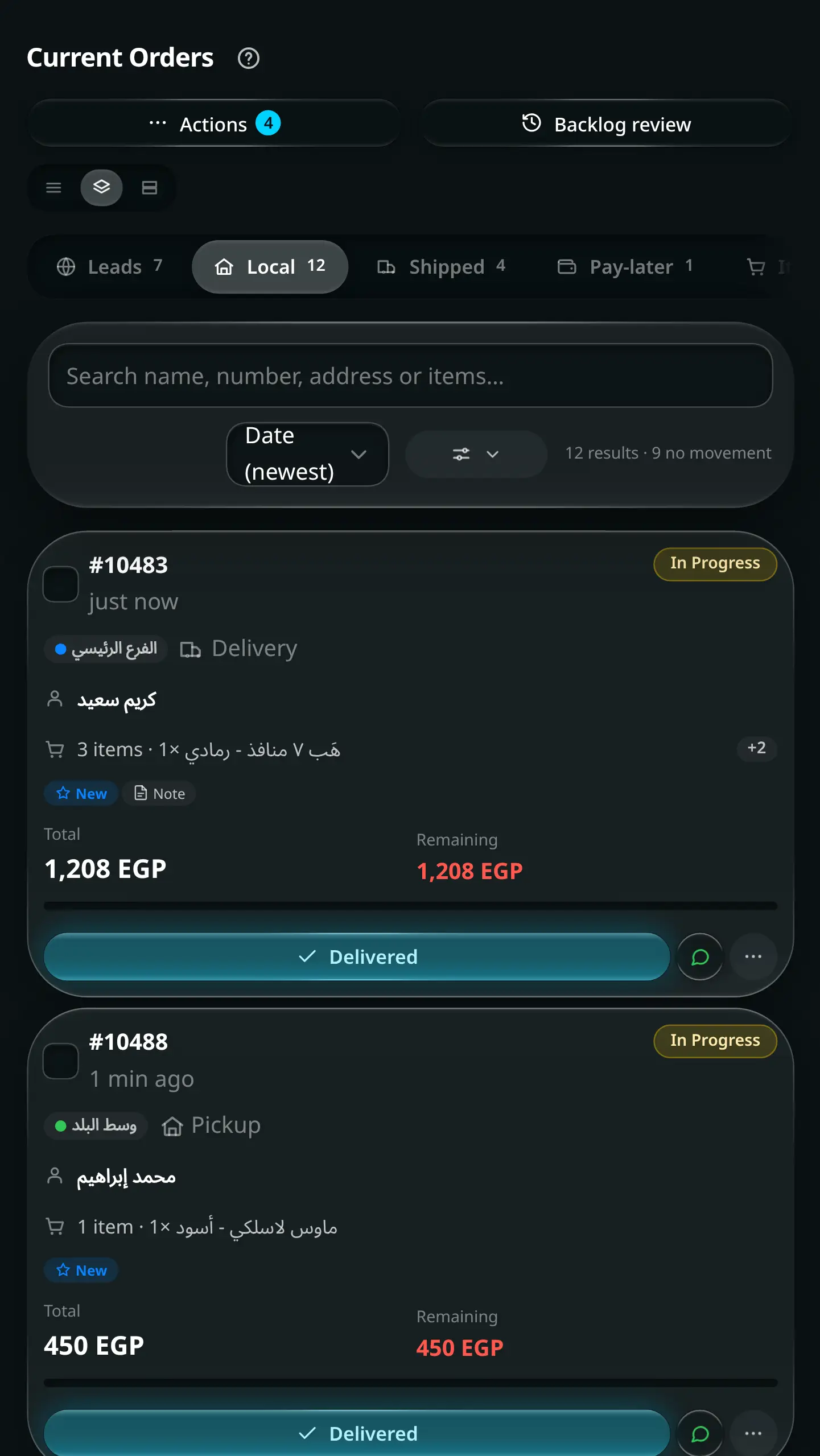
The current orders pipeline: tabs for online leads, local delivery, shipped and pay-later, with status badges, delivery dates and per-order actions.

Stock

A count you can believe on a Tuesday afternoon

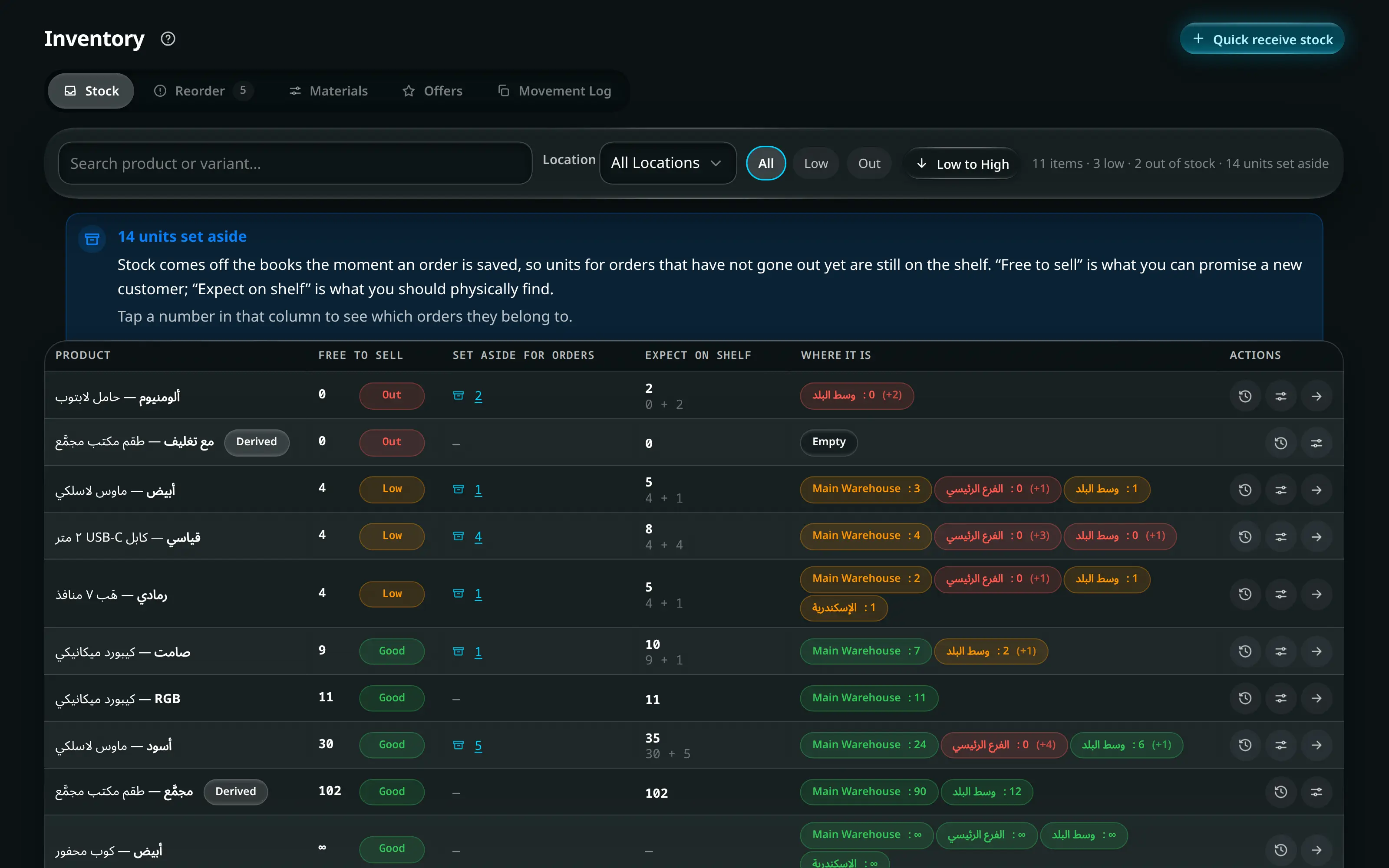
Stock per branch and warehouse, moving-average cost that updates itself as you receive, and products that can be assembled from materials so making one thing correctly reduces four others.

  • Receive stock from a supplier or a one-off purchase — the books differ, so the app does too
  • Reorder view: what is low, how much to buy, from which supplier
  • Full movement history per variant — receipts, sales, returns, transfers
  • Counted sessions with a mobile-first ±44px counting screen
The inventory screen: stock per branch and warehouse with low-stock and out-of-stock filters, distribution across locations, and moving-average cost per item.

Cash

The drawer balances, or you find out why

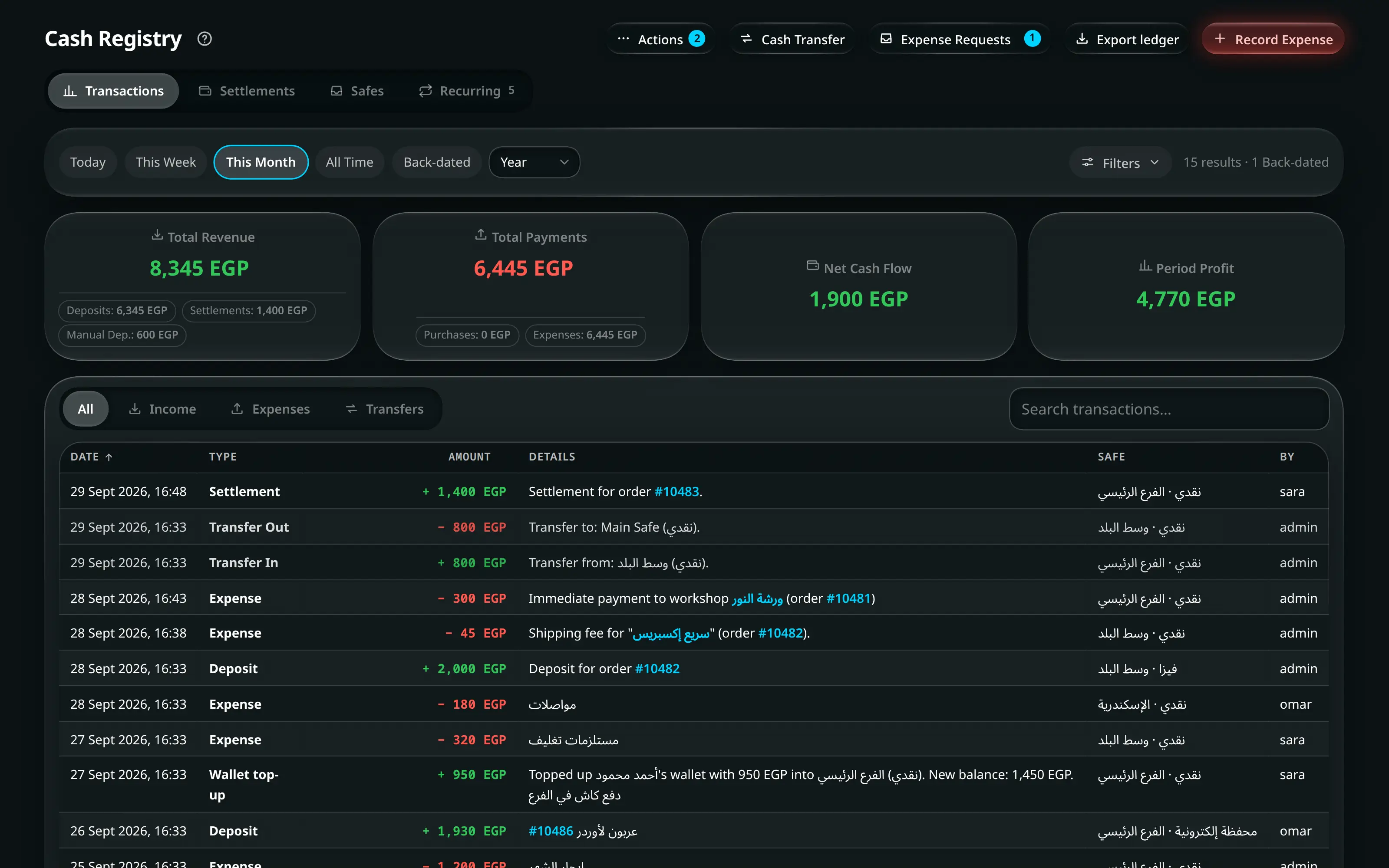
Every pound in and out — sales, expenses, transfers, supplier payments, salary advances — in one ledger, per branch, per safe, per person.

  • Blind end-of-day count: staff enter what they have, the app compares
  • Expense requests approved against real available funds, not optimism
  • Cash transfers between safes and branches with a running balance
  • An integrity audit that hunts orphans, duplicates and deposit mismatches
The cash registry: revenue, payments, net and period profit at the top, then a filterable ledger of every transaction with links back to the order that caused it.

Team

Attendance, payroll and approvals that agree with each other

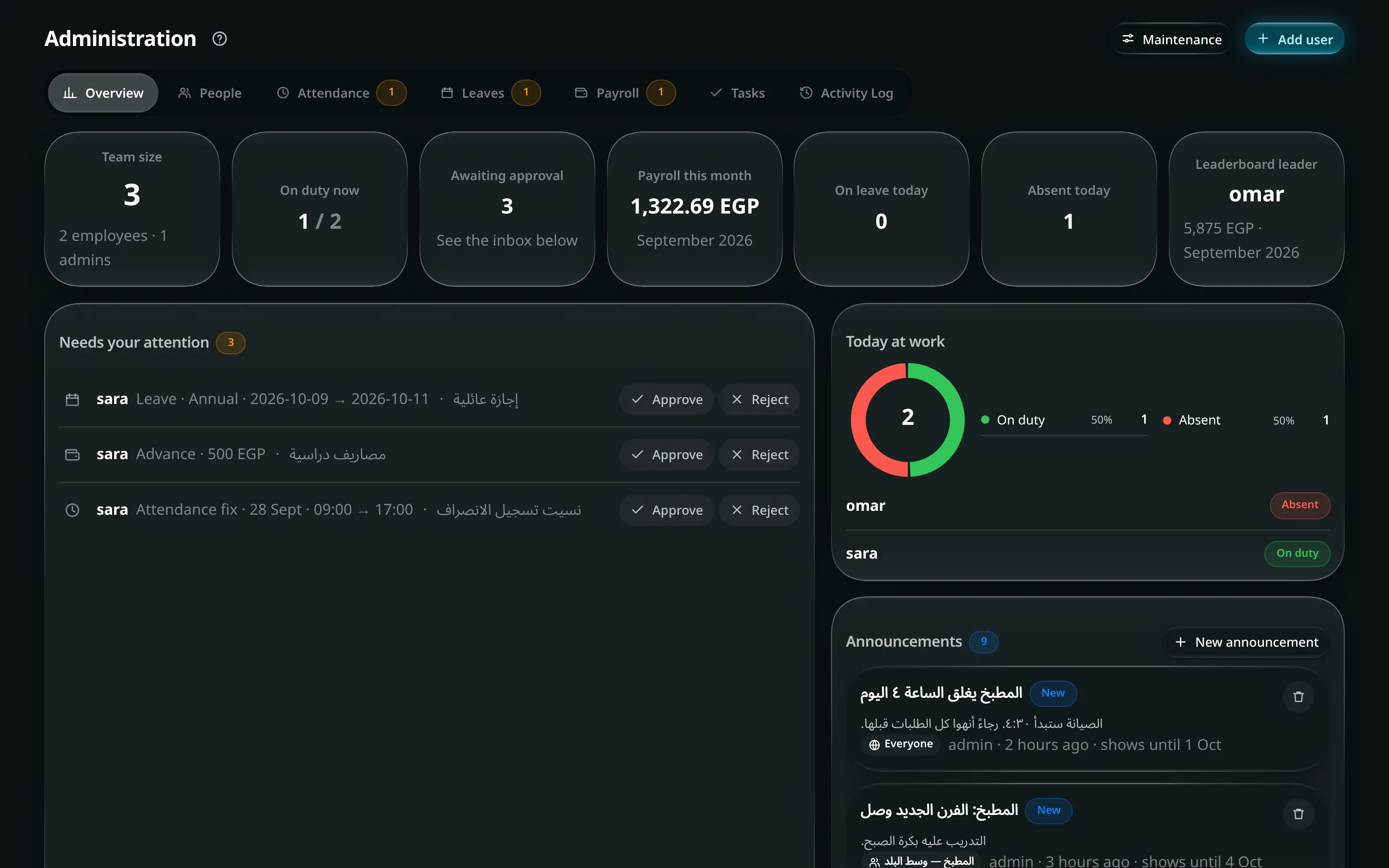
Shifts, lateness rules, leave requests, salary advances and payroll run off the same attendance record — so what you pay matches what happened.

  • Lateness and deduction rules you set once, applied consistently
  • Leave and advance requests with an approval queue on the home screen
  • Payslips that print
  • An activity log that renders in the reader’s language, not the writer’s
The administration screen: people, attendance, leave requests, payroll and the activity log in one place.

Customers

Who buys, who owes, who is worth calling

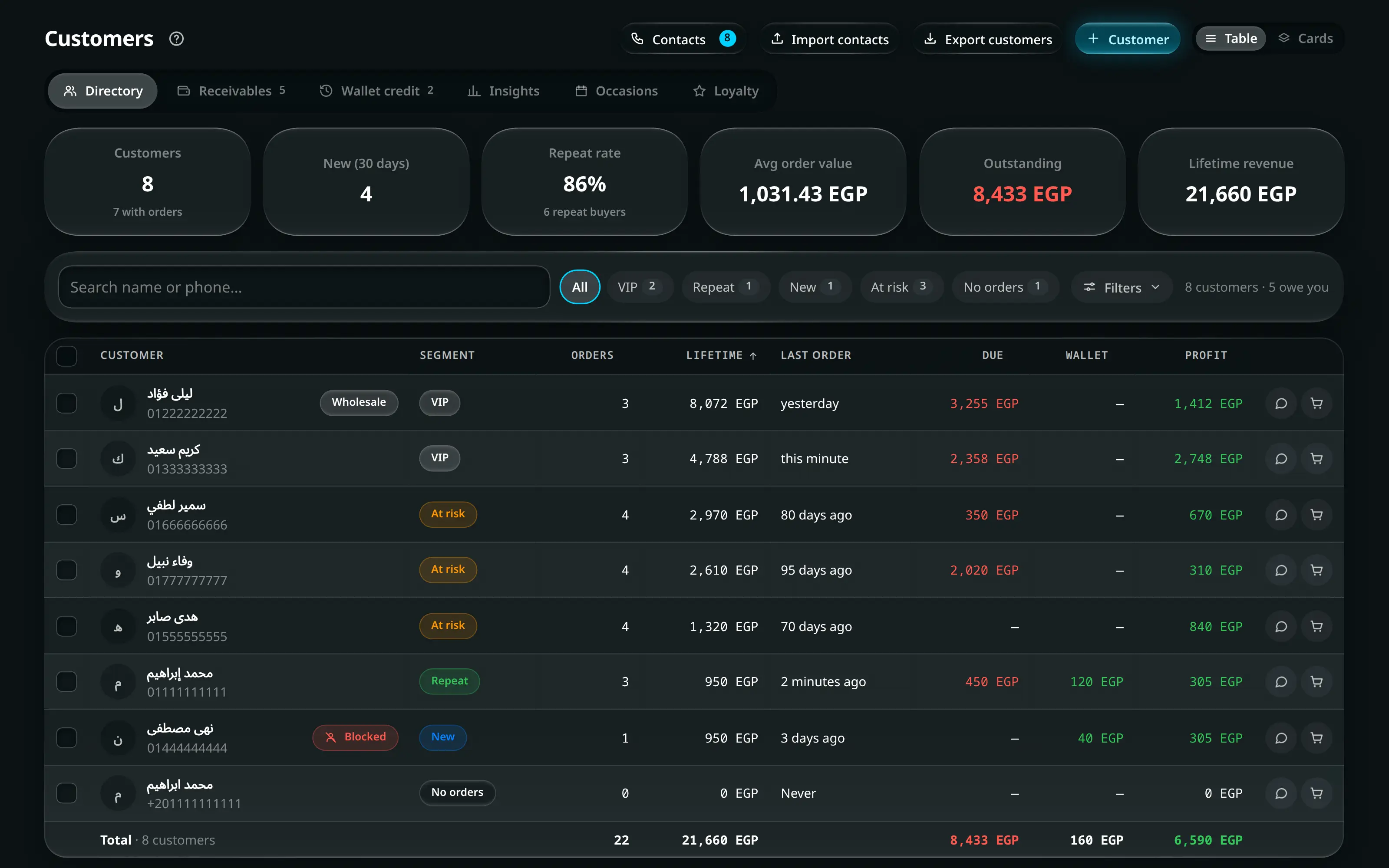
Every order builds the customer record automatically — addresses, order history, outstanding balance, wallet credit and profit per customer.

  • Search by name or phone, with fuzzy matching for near-misses
  • Receivables in one view instead of scattered across orders
  • Wallet credit for returns and goodwill, spendable at the till
  • Retail and wholesale pricing on the same customer record
The customers directory: each customer with their order count, total spend and outstanding balance, filterable by retail or wholesale.

Online store

Your storefront, open at 2am

A real storefront on the same database. Same products, same stock, same customers — no sync job, no plugin, no second inventory to keep honest.

  • Cart that follows a signed-in customer between phone and laptop
  • Abandoned carts you can actually see and act on
  • Delivery or shipping chosen server-side from the customer’s city
  • Coupons validated on the server, never exposed to the browser
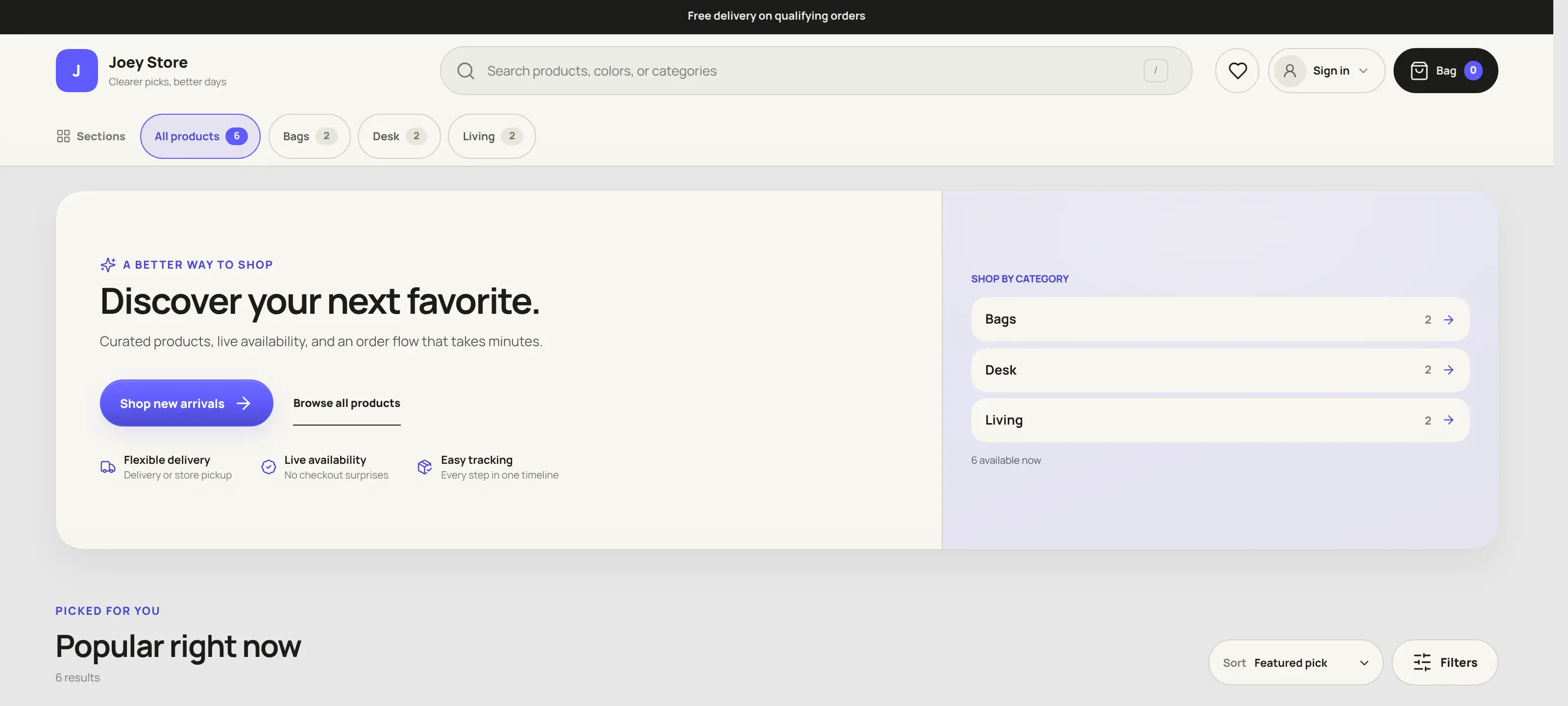
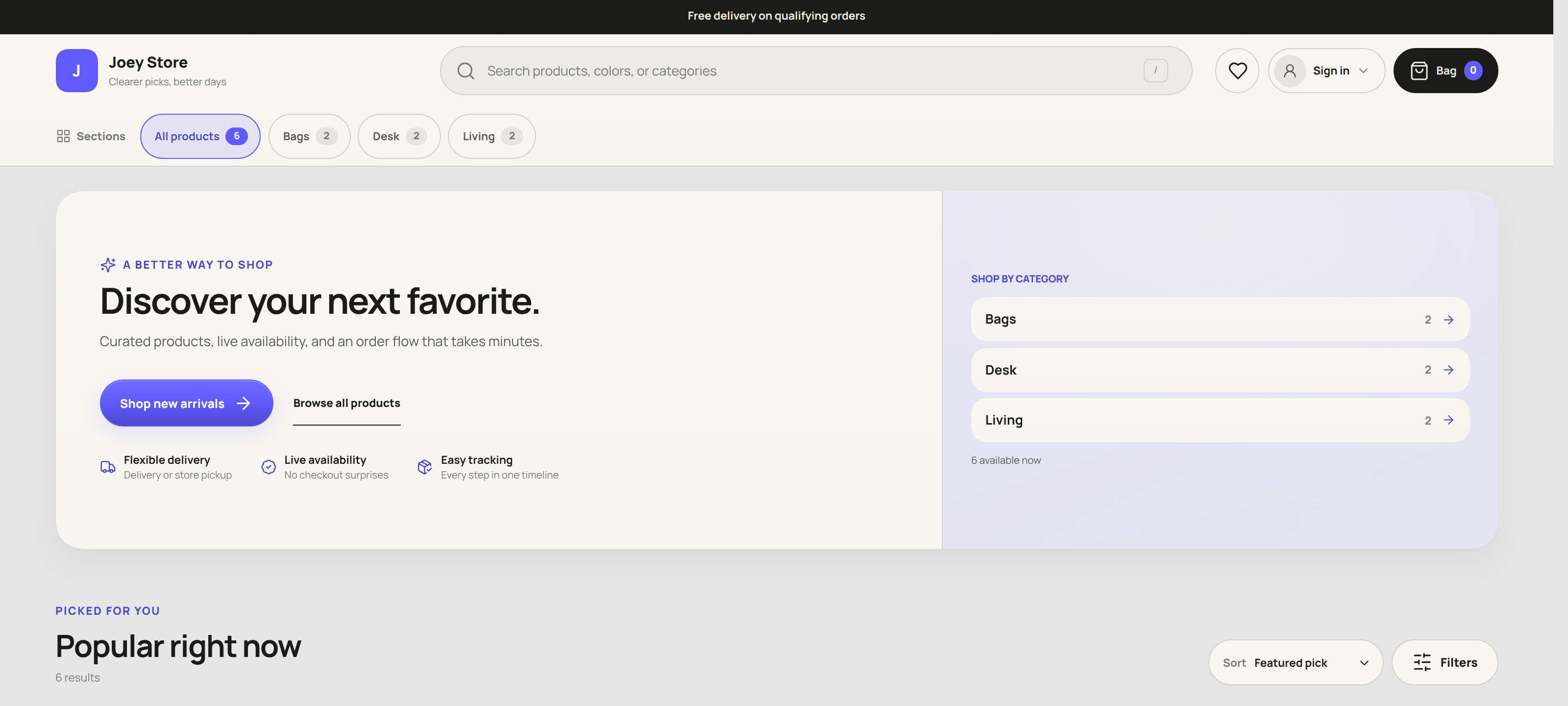
The Joey Cash storefront: its own hero, a shop-by-category rail and a live product count, in the storefront’s warm off-white and indigo theme.

Anywhere you are

The counter, your pocket, and the back office

The same app, the same data, the same moment. Serve a customer on the terminal, check the day’s takings from your phone on the way home, and do the month on a laptop — no separate versions, no “that feature is desktop only”.

The cash registry: revenue, payments, net and period profit at the top, then a filterable ledger of every transaction with links back to the order that caused it.
The current orders pipeline: tabs for online leads, local delivery, shipped and pay-later, with status badges, delivery dates and per-order actions.
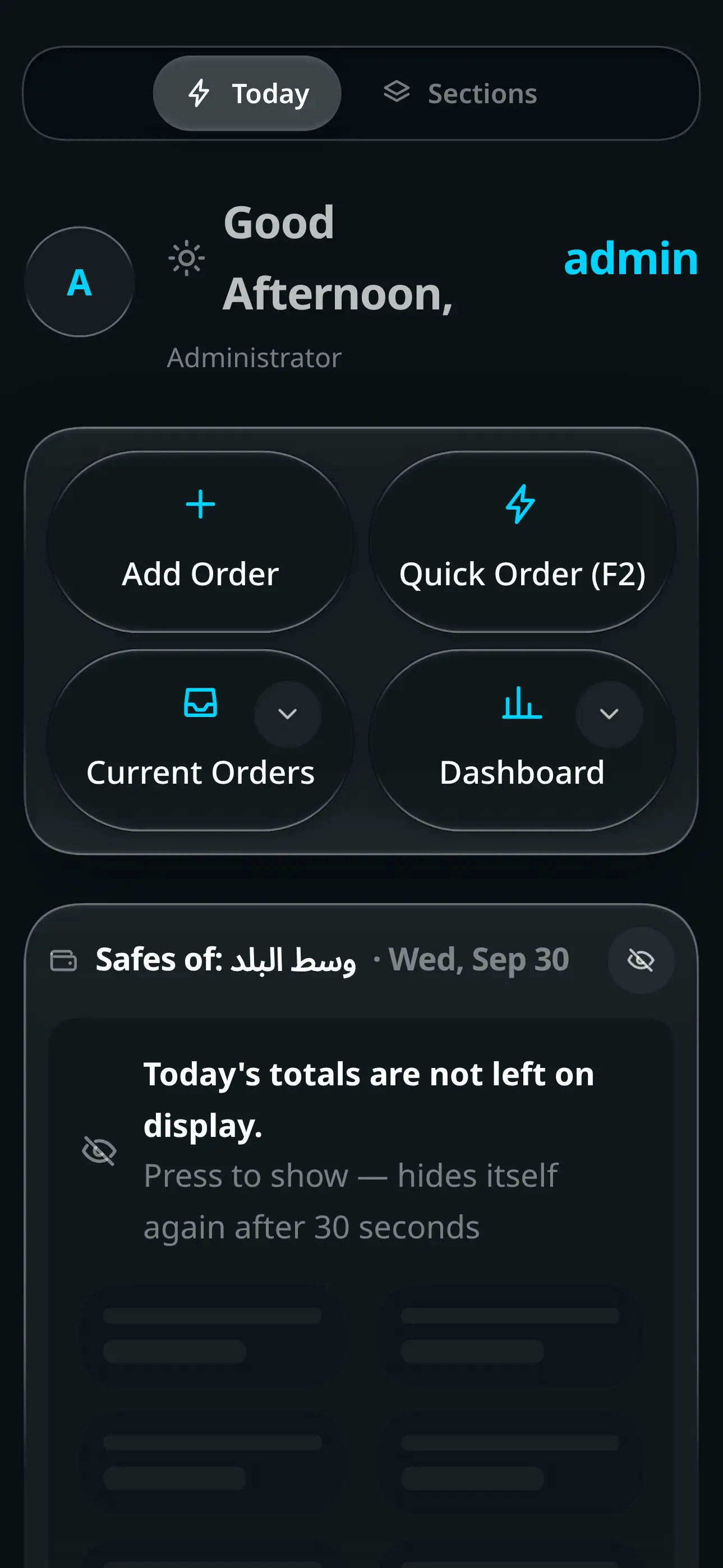
The Joey Cash home screen: a tile grid of every workspace beside a command centre with today’s cash drawer, alerts and pending approvals.
  • POS terminal

    Built for the machine you already bought

    Designed against cheap Android terminals, not just demoed on one. Big touch targets, one-key Quick Order, and a lighter-visuals mode that turns the blur effects off so the screen keeps up.

  • Phone

    The whole business in your pocket

    Installs as a real app from the browser — no store, no download. Approve an expense, check stock, or look at today’s cash from wherever you are.

  • Laptop

    Where the month gets closed

    The wide screens: payroll, supplier balances, the full ledger, reports and exports. Everything the counter does not need and the office cannot do without.

Installs as an app on Android, iOS, Windows and Mac. Nothing to buy from a store.

The details

The parts people notice in week two

Not headline features. The things that decide whether staff actually use the system.

  • Quick Order on F2

    For a sale that is complete at the counter: the goods are ready, the customer takes them, the full amount is collected. Scan, take payment, done — and hold up to five sales if someone wanders off mid-purchase.

  • Jump anywhere with Ctrl+K

    Search across every screen, order, product and customer you have permission to see. Type three letters, press enter.

  • It keeps working offline

    Orders and comments queue locally and are validated on the server when the connection returns — with a review queue for anything that no longer adds up.

  • Blind end-of-day count

    Staff count the drawer without seeing the expected figure. The difference is recorded, not argued about.

  • Workshop jobs

    Send an item out for work, track the cost and the balance you owe the workshop, and stop it leaving before the fee is settled.

  • Courier settlement

    Give a courier six orders, settle the run in one screen, and fill the courier’s own spreadsheet template with your rows.

  • Barcodes and labels

    Generate and assign barcodes, then print sheets of labels. No third-party service, no per-label fee.

  • WhatsApp templates

    Per-status messages with real variables. Order confirmed, out for delivery, ready for pickup — in the customer’s language.

  • Multiple branches

    Stock, safes, staff, counts and delivery pricing per branch, with one place to see all of them.

Included, not an add-on

A storefront that shares your stock

Most businesses end up with a website that has its own product list, its own stock numbers and its own idea of who your customers are. This one does not have any of those, because it reads the same database your counter does.

  • Sell the same catalogue you sell at the counter — variants, bundles and offers included
  • Wholesale and reseller portal with trade pricing and credit terms
  • Customers upload payment proof; you review it in the same queue as everything else
  • Product reviews with moderation, restock requests, and a wishlist
See how the storefront works
The Joey Cash storefront: its own hero, a shop-by-category rail and a live product count, in the storefront’s warm off-white and indigo theme.

Pricing

Pick the plan that matches your business

Prices in Egyptian pounds. No setup fee, and no charge for the onboarding call.

Basic

One shop, a small team, everything in the cloud.

EGP 350/mo

14-day free trial

Choose Basic
  • 1 branch, 1 admin, up to 5 staff
  • Orders, Quick Order and the full pipeline
  • Stock, counted sessions and loss reports
  • Cash registry with end-of-day settlement
  • Customers, receivables and wallet credit
  • Attendance, leave and salary advances
  • Works offline, installs as an app
  • Automatic cloud backup
  • Free onboarding call

Most popular

Pro

Multiple branches, the full back office, and your online store.

EGP 500/mo

14-day free trial

Choose Pro

Everything in Basic, plus

  • Unlimited branches, staff and admins
  • Your online store, on the same database
  • Wholesale and reseller portal
  • Suppliers, supply orders and payables
  • Workshops and outsourced jobs
  • Couriers, delivery pricing and settlement
  • Materials, assembly and moving-average cost
  • Payroll, tasks and the full activity log
  • Stock transfers between branches
  • Priority support

Device licence

One machine, fully offline, paid once.

EGP 2,500One-time payment

Choose Device licence
  • One device, yours permanently
  • Orders, stock and cash — all of it, offline
  • Bug fixes and patches included
  • Email support

Something else in mind?

More branches, a migration from another system, or a feature you need before you can switch — tell us and we will give you a straight answer.

Ask about a custom plan

Questions

The things people ask before they switch

What happens when the internet goes down?

You keep selling. Orders and comments are saved on the device and queued. When the connection comes back they are sent to the server, re-checked against current stock and prices, and anything that no longer adds up goes into a review queue rather than being silently accepted. Nothing is lost and nothing is trusted blindly.

Can I use it entirely in Arabic?

Yes, and it is the same app, not a reduced version. The whole interface mirrors to right-to-left, numbers render as Arabic-Indic digits, and the activity log renders each entry in whichever language the reader is using — so an Arabic-speaking manager reads a log written by an English-speaking colleague in Arabic.

Do I need new hardware?

No. It runs in a browser and installs as an app on Android, iOS, Windows and Mac. It is built to be usable on cheap Android POS terminals, and there is a lighter-visuals mode that turns off the blur effects for older devices.

How do I pay?

By Instapay or bank transfer. You choose a plan, transfer the amount, and upload the payment screenshot. We verify it and activate your account — usually the same day. Card payment is not available yet.

Can I move from the system I use now?

Usually, yes. Products, customers and current stock are the pieces that matter, and those can normally be imported from a spreadsheet. Talk to us before you buy and we will tell you honestly what will and will not come across.

What is the difference between the device licence and the online plans?

The device licence is a one-time payment for a single machine that runs offline and is never synced anywhere. The online plans put your data in the cloud, so multiple people and branches see the same numbers at once, you can reach it from your phone, and it is backed up automatically. Most businesses with more than one person want an online plan.

Ready to see your business on one screen?

Pick a plan and you can be running today, or send us a message first and we will answer honestly whether it fits.

About

Built for the businesses we actually sat in

Joey Cash started because a shop we knew was running on four notebooks, two spreadsheets and a WhatsApp group, and every one of them disagreed with the others by the end of the month.

So it is not built the way retail software usually is. There is no module you buy separately for stock. The online store is not a plugin. Arabic is not a translation layer bolted on at the end — it is how the app was designed, and English is the second language, not the first.

It is still built the same way: by a small team, against real businesses, with the people using it telling us what is wrong.