
- Where it is
- Home
- Administration
- Who can open it
- EveryoneEveryone — but an employee sees a different screen, titled My Work, holding only their own schedule, attendance, leave, payslip, tasks and their own log entries.
- Tabs
- Overview
- People
- Attendance
- Leaves
- Payroll
- Tasks
- Activity Log
- What it writes
- User accounts, usernames, roles, branches, departments, schedules and pay rules
- Departments
- Attendance records and corrections
- Leave requests and their approval
- Salary advances, deductions and payslip payments — with a cash registry expense
- Tasks, one record per assignee
- Announcements, with their own expiry
- Employee documents, in the database and in storage
My Work — the same screen, on an employee’s account
An employee’s tile is called My Work, and it holds two tabs rather than seven: Overview and Activity Log. Everything on it is about them.
The card at the top is the punch clock. It states where you stand — On duty, Checked out or Not checked in — with Today’s shift beside it, which reads either the hours, On leave or Day off. The one large button is Check in, and Check out once you are on.
Under it, your own figures and lists:
| Card | Holds |
|---|---|
| Worked today · Leave remaining · Net this month | The three numbers, for you |
| My payslip | Base, Additions, Deductions and Net, with See what was deducted and Print payslip |
| My leave requests | Yours, as Pending · Approved · Rejected. Empty, it says You have no leave requests. |
| My tasks | Assigned to you, by deadline. Empty: No tasks assigned to you. |
| My documents | Your contract, ID and certificates, as filed by an administrator |
The three things you can ask for are in the title row, and they are requests, not actions: Request leave, Request advance, Fix attendance — the last one for the shift you forgot to clock in or out of.
Administrators only
Overview
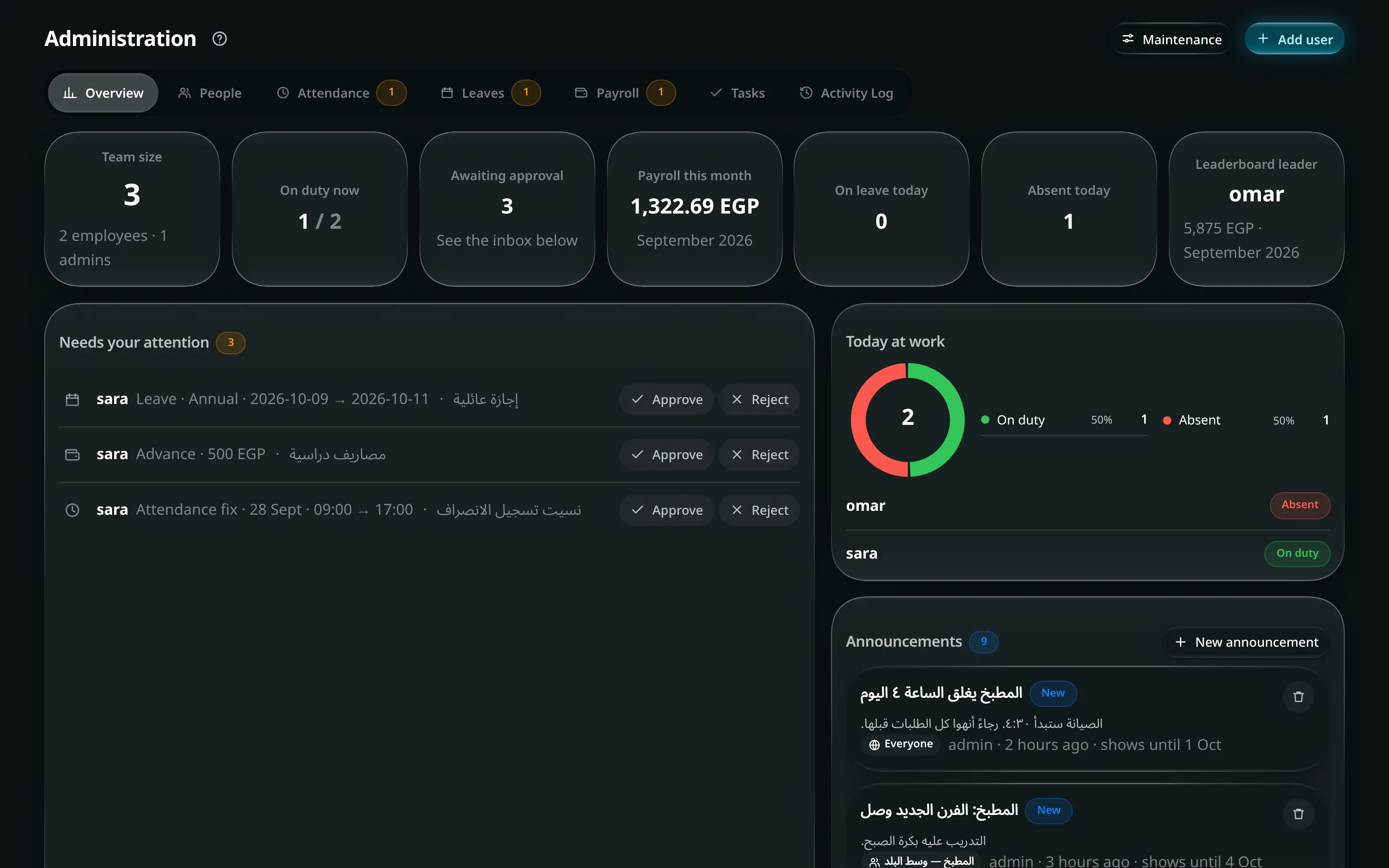
Team KPIs and the approval queues. The tabs carry counts when something is waiting — Leaves3 means three requests need an answer, and a tab with nothing waiting shows no number at all.
Everything waiting on you is gathered in Needs your attention, one compact row per request: who asked and what for on the first line, their reason on the second (cut at two lines — hover or long-press it for the rest), and approve and reject at the end — folded into one ⋯ on a phone. On a wide screen the reason sits on the same line when it fits.
Announcements
Post it with a Title (The kitchen closes at 4 today), optional Details, Who sees it — Everyone, specific departments, or specific people — and Show it for: today only, 3 days, a week, two weeks, a month.
People
- Administration
- People
- + User
Username — They sign in with this — plus name, role, branch and, optionally, a department: a branch is where they work, a department is who they work with.
A taken username is refused: That username is already taken. Renaming one later updates every record that stores this name.
The weekly pattern of working days and hours.
Base salary, overtime rate, annual leave days, and Lateness rules — checked in this order; the first rule that applies wins.
Attach documentsoptionalاختياري
- a person
- Documents
Contract, ID / permit, certificate or other, with a label and an optional Expires on — only for documents that actually expire, like an ID.
See their devicesoptionalاختياري
- a person
- Devices
Every browser signed in to that account, with a sign-out per row: Ending a session signs that device out as soon as it is online.
Roster, filters and the Org view
Active Deactivated All pick the roster; the Filters2 panel narrows it by department, branch, role and setup state.
The results line carries a quiet count — 12 users · 3 need setup — where “needs setup” means one of five gaps that make a record half-useful: no department, no branch, no schedule, no base salary, no email. A deactivated account has no gaps by definition.
Org switches from the roster to the structure: departments grouped by branch, company-wide first.
Changing many people at once
Select rows, then Edit….
Announce on a selection pre-fills an announcement’s audience.
Attendance
Today’s attendance, plus the correction queue. An employee who forgot to clock in files a correction; you approve or reject it here. The columns sort — press Hours, Late or Overtime to bring the day’s outliers to the top.
Leaves
Requests with their type, dates and balance. Each person’s remaining balance — Leave remaining and Taken this year — is shown beside the request, so the decision does not need a second screen.
Payroll
Per month, per person: base, overtime, deduction breakdown, advances taken, and the payslip.
| Control | Does |
|---|---|
| Pay from | Which branch and safe the money leaves |
| Payment method | How it is paid |
| Deduction (−) | A manual deduction on top of the computed ones |
| Payslip | The printable slip |
Where a person has deductions, the figure is a link: press it to see the breakdown that produced it rather than reading a number you cannot take apart. With more than one person on the month, the table ends with a totals row — base, additions, deductions and net for everybody on it, so the payroll’s own bottom line is on the same screen as the people it is made of.
Tasks
Assign a task with a title, an assignee and a deadline.
Activity Log
The audit trail, most recent 200 entries, live.
| Role | Sees |
|---|---|
| Administrator | Everything, with filters by search, user, type and date |
| Employee | Only entries tied to their own orders. No filter card |
Each entry carries what happened, who did it, when, and — where the action was about an order — a link straight to that order.
The log is where a bulk edit and its undo appear as two separate lines. An undo does not erase the record of the change; it records that it was undone.