
- Where it is
- Home
- Cash Registry
- Who can open it
- Administrators onlyAn employee account cannot open this screen at all.
- Tabs
- Transactions
- Settlements
- Safes
- Recurring
- What it writes
- Ledger entries — income, expense and transfer
- Safe balances
- Approved or rejected daily settlements and expense requests — a refusal carries its reason back to the employee who sent it
- A recurring charge, and an ordinary expense each time one is paid
Every screen in Joey Cash that touches money writes into this one. Nothing here is typed twice: a sale, a settlement, a refund, a supplier payment and a payroll run all arrive as entries, each carrying a link back to whatever caused it.
Transactions
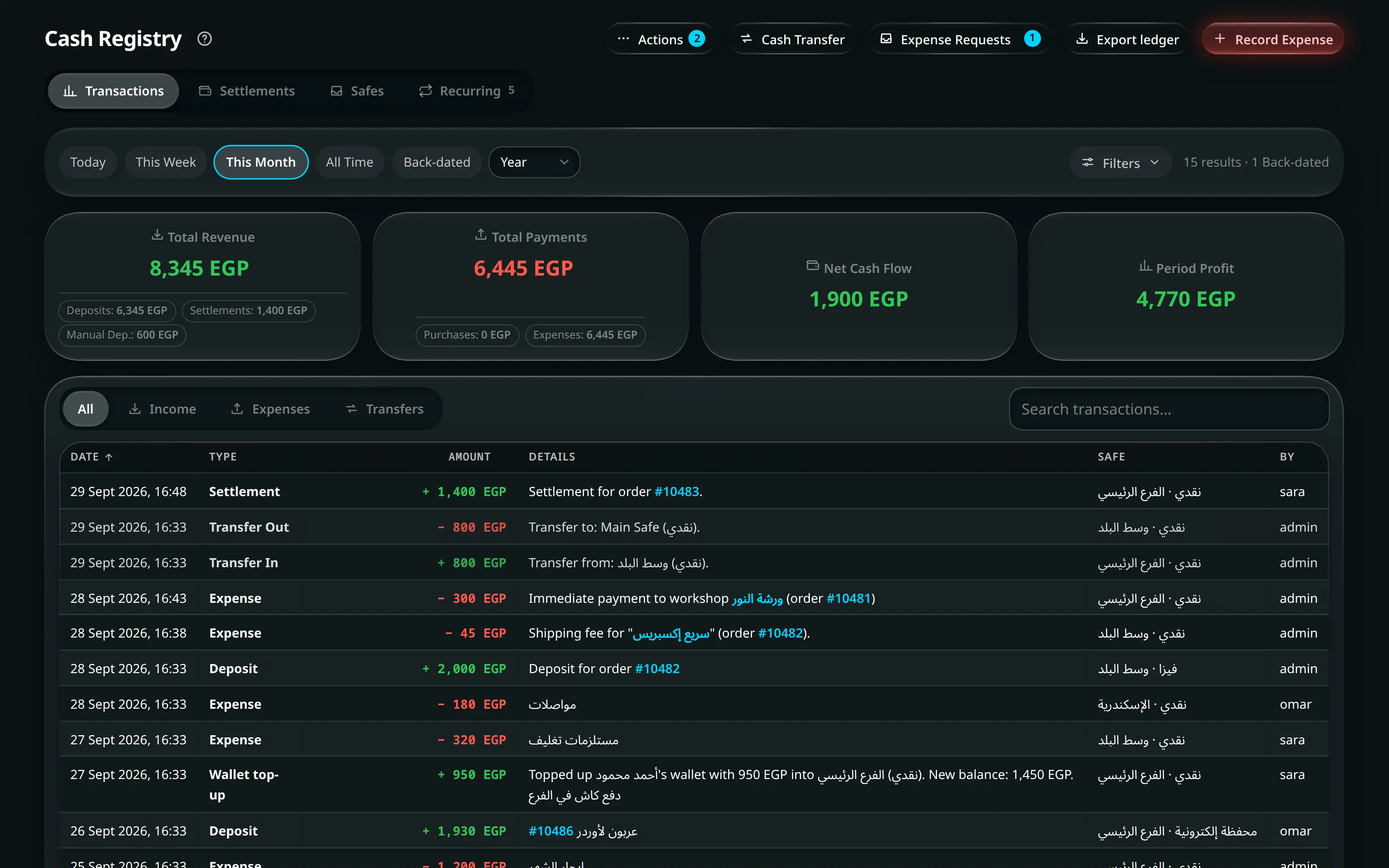
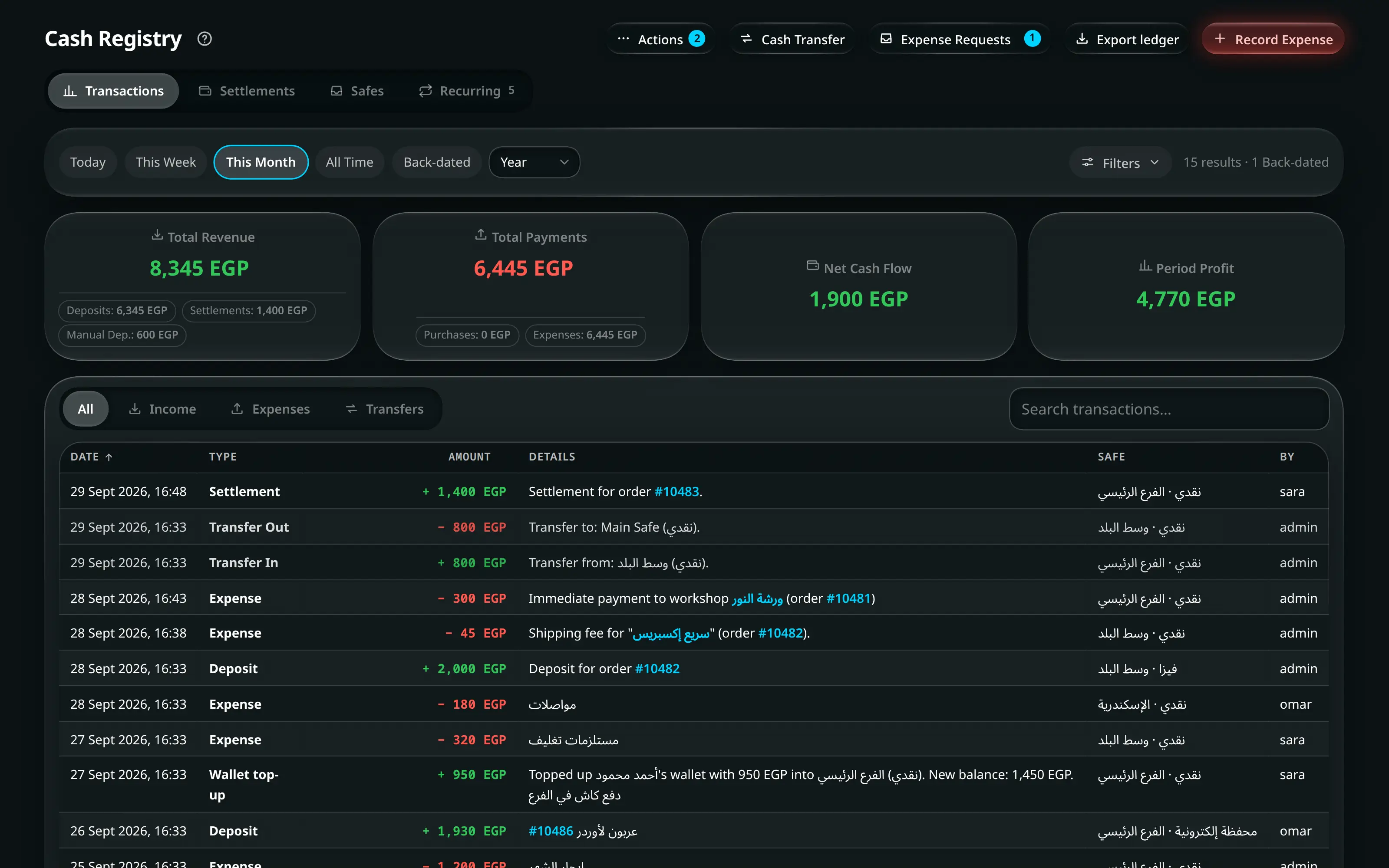
Numbered on the screenshot
- 1Transactions, Settlements, Safes and Recurring. The Recurring tab carries a count when something is due.
- 2Record Expense — red, because the money is leaving — plus Cash Transfer, Manual Adjustment, Expense Requests and the export.
- 3Search the ledger.
- 4Dates, branch, employee, payment method and settlement status.
- 5The whole toolbar, including the period that scopes every figure above the table.
The KPI strip above the table is scoped by whatever the toolbar is filtering:
| Figure | Is |
|---|---|
| Total Revenue | Money in, from sales |
| Settlements · Manual Dep. | The other two ways money arrives |
| Total Payments · Expenses | Money out |
| Period Profit | Revenue minus cost of goods minus expenses, for the period |
Four report tabs narrow the table itself: All · Income · Expenses · Transfers. The columns are Date · Type · Amount · Details · Safe · By, in that order, and the details carry a link back to the order or supply order behind the entry.
Every column except the details can be sorted — press the heading. Sorting applies to the whole filtered ledger, not to the page you are looking at, and the amount sorts by what it did to the safe: money in above zero, money out below it.
The table ends with a totals row: the net for everything the tabs, the search and the filters let through, with money in and money out stated separately beneath it, and a count of the entries it summed. It is not the page’s total — page 1 of 9 cannot be mistaken for the whole period.
Actions in the title row
| Button | Does |
|---|---|
| Record Expense | Books money out of a safe now |
| Cash Transfer | Moves money between safes |
| Manual Adjustment | Corrects a safe balance, with a reason |
| Expense Requests | The approval queue |
| Export ledger | CSV |
Safes
A running balance per safe, per branch. Safes themselves are defined per branch in Resources; the Main Safe is where branch money is consolidated.
The money in a safe comes from three places and leaves through three:
| In | Out |
|---|---|
| Sales taken at that branch | Expenses recorded against it |
| Courier settlements paid into it | Refunds |
| Transfers from another safe | Transfers to the main safe |
Settlements — the end of the day
An employee closes their day from the Daily cash drawer card on the home screen; this tab is where an administrator reviews what they sent. Their half of it — counting, the blind count, the denomination pad and what each verdict means — is documented in full in The daily cash drawer.
- Home
- Today
- Daily cash drawer
- Settle today
They enter what is physically in each safe, and send it. Nothing moves.
Everything matches, or short by … / over by … per safe, with a Notes box for anything the administrator should know.
Send for review. Nothing moves yet: no cash moves until it is approved.
- Cash Registry
- Settlements
- a settlement
Each safe on the card carries Exp — what the ledger said — Act — what was counted — and Diff. A settlement still waiting on you carries a fourth line, Moved since, on any safe whose balance is no longer what was counted.
Approve & Deposit books the settlement and any variance. Reject sends it back.
Start of day
The counterpart. — from the drawer card or Ctrl+K — confirms what each safe opened with. Where it matches, nothing is written; where it does not, each variance is written to the safe immediately so the drawer matches reality from the first sale of the day.
Expense requests
An employee cannot take money out of a safe. They send a request — reason, amount, preferred branch and payment method — and it waits.
An administrator recording an expense sees a different message from an employee requesting one, and both are explicit: You are an admin, so it books straight to the safe versus Nothing leaves the safe until an admin approves it.
Recording an expense larger than the safe holds warns first: This safe holds … Recording it will take the balance negative.
Recurring charges
- Cash Registry
- Recurring
Rent, taxes, the internet line, a licence renewal — money that leaves on a calendar rather than on an order.
New charge.
Field What is it? e.g. Shop rent — Main branch Repeats The rhythm First due date · Ends on (optional) The window Paid from Which branch and safe The amount changes each time For a bill you have to read. You are asked for the amount when you record it Tell me this many days early The reminder window Record it for me on the due date Automatic recording Record payment on the occurrence, or Record all for several at once.
Skip oneoptionalاختياري
Skip settles an occurrence with no money — for the month the landlord waived, or a bill that did not arrive. Undo skip reverses it.
A reminder you cannot answer is one people learn to ignore, which is why skipping exists at all.
Automatic recording
Opt-in per charge, and hedged at every step. It only runs for a fixed amount with a branch and a safe chosen, only during a real administrator’s session, only when the charge is already due, never more than a month late, never beyond what the safe holds, and never twice for the same occurrence. Anything it declines simply stays in the reminder list.
The screen tells you when a charge cannot qualify: Automatic recording needs a fixed amount, a branch and a safe.
Where the reminder appears
Two places, both silent when there is nothing to say:
- The count on the Recurring2 tab.
- The Recurring Charges widget in the home screen’s Command Center.
No modal on open, no daily toast, no push notification.