
- Where it is
- Home
- Resources
- Who can open it
- Administrators onlyAn employee account cannot open this screen at all.
- Tabs
- Catalog
- Inventory
- Operations
- Config
- What it writes
- Whichever collection the open tool owns — products, offers, bundles, services, materials, branches, shippers, statuses, sources, payments or settings
- Uploaded images, to storage
- Easy setup: the shop name, a first branch, payment methods and the standard order stages — each into the same record its own tool writes
Almost everything the rest of the app offers you a choice of is defined here. If a dropdown somewhere is missing an option, this is where you add it.
Easy setup — a new shop’s first ten minutes
- Resources
- Easy setup
Easy setup sits in the head beside the add button, with a count of the steps still open. It opens Set up your shop: Five things and you can take your first order. Each one takes a minute, and everything here can be changed later in Resources. The first time an administrator opens Resources in a session, and the shop still has no name or no branch, it opens by itself.
The shop’s name, an optional slogan, and the country code customers’ WhatsApp numbers start with. Written into General Settings.
A name and a phone. Every order belongs to a branch: it numbers the order and puts its phone on the receipt. Numbering, delivery fees and the map pin wait for the Branches tool.
Cash into the drawer, and any wallet or account you accept, with the number customers pay into. At least one is required.
Use the standard stages writes the usual set in one go, or Design my own takes you to Statuses.
Add a product takes you to Products with the new-product form open. The first one is enough; the rest at your own pace.
Only if you send orders out: Add a shipping company or Add a delivery courier.
A step that needs the real tool does not copy it. The sheet folds into a small pill at the bottom of the screen and the tool it sent you to opens, so you learn where the thing lives while doing it. The pill reads Save here to continue. When you save, the sheet comes back by itself on the next step, opening with Done — (the step you just finished). Tap the pill at any time to bring the sheet back without saving.
Every step also ends with a Lives in line naming the tool that owns it, and Show me goes there with nothing to fill in (the pill then reads Tap to continue). A step already done shows You have: and what is there, so running it again does no harm.
Save and continue moves on, Skip for now leaves a step open, and Finish later closes the sheet. The count on the head button remembers where you stopped.
The last page, Your shop is ready, has two lists:
- What to do now: Take your first order · Open your online store · Invite your team.
- Learn and get help: Your first week, step by step · The manual for this screen · Support · Common questions · Contact us · What’s new. Each one opens this site in a new tab.
The fifteen tools
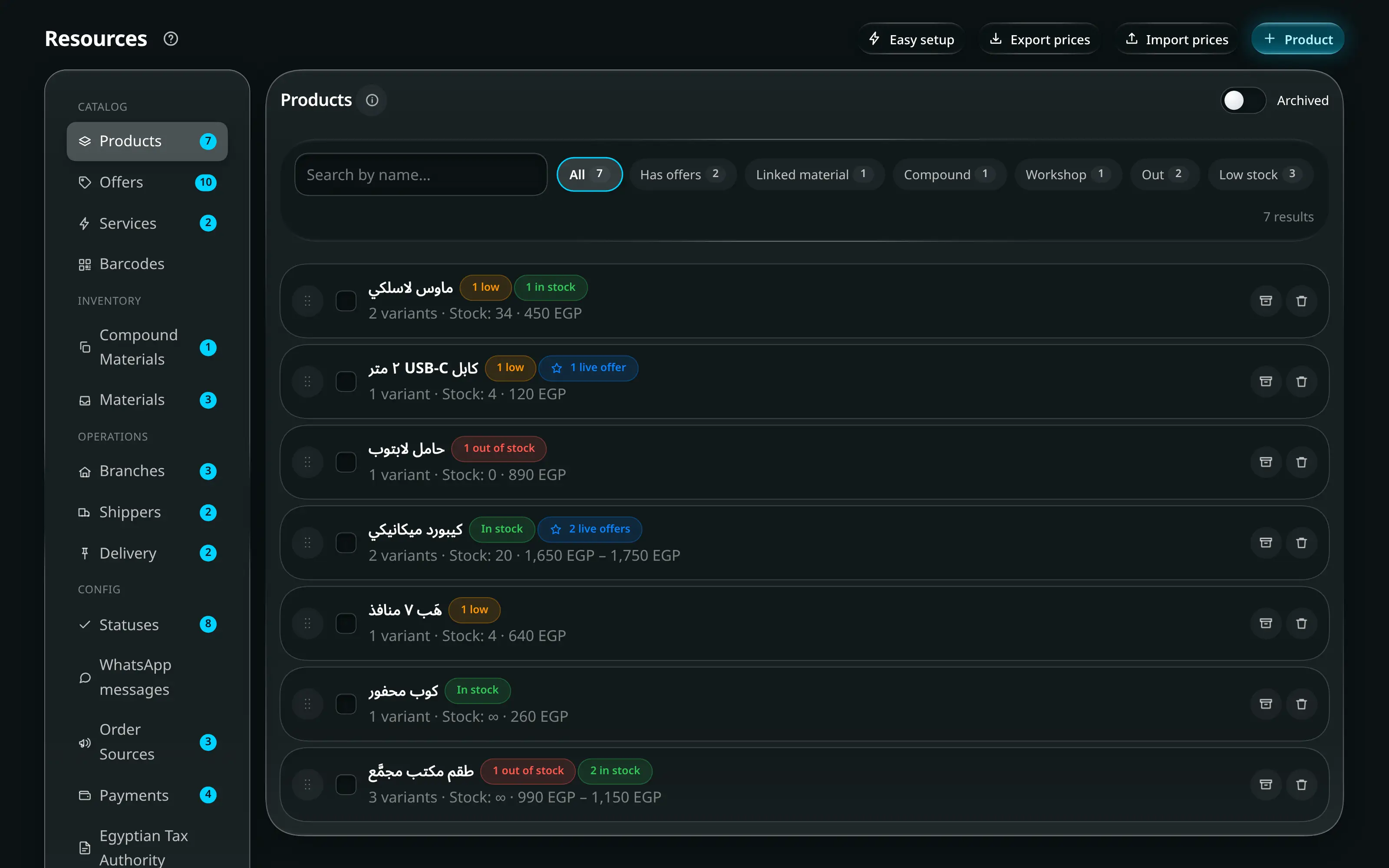
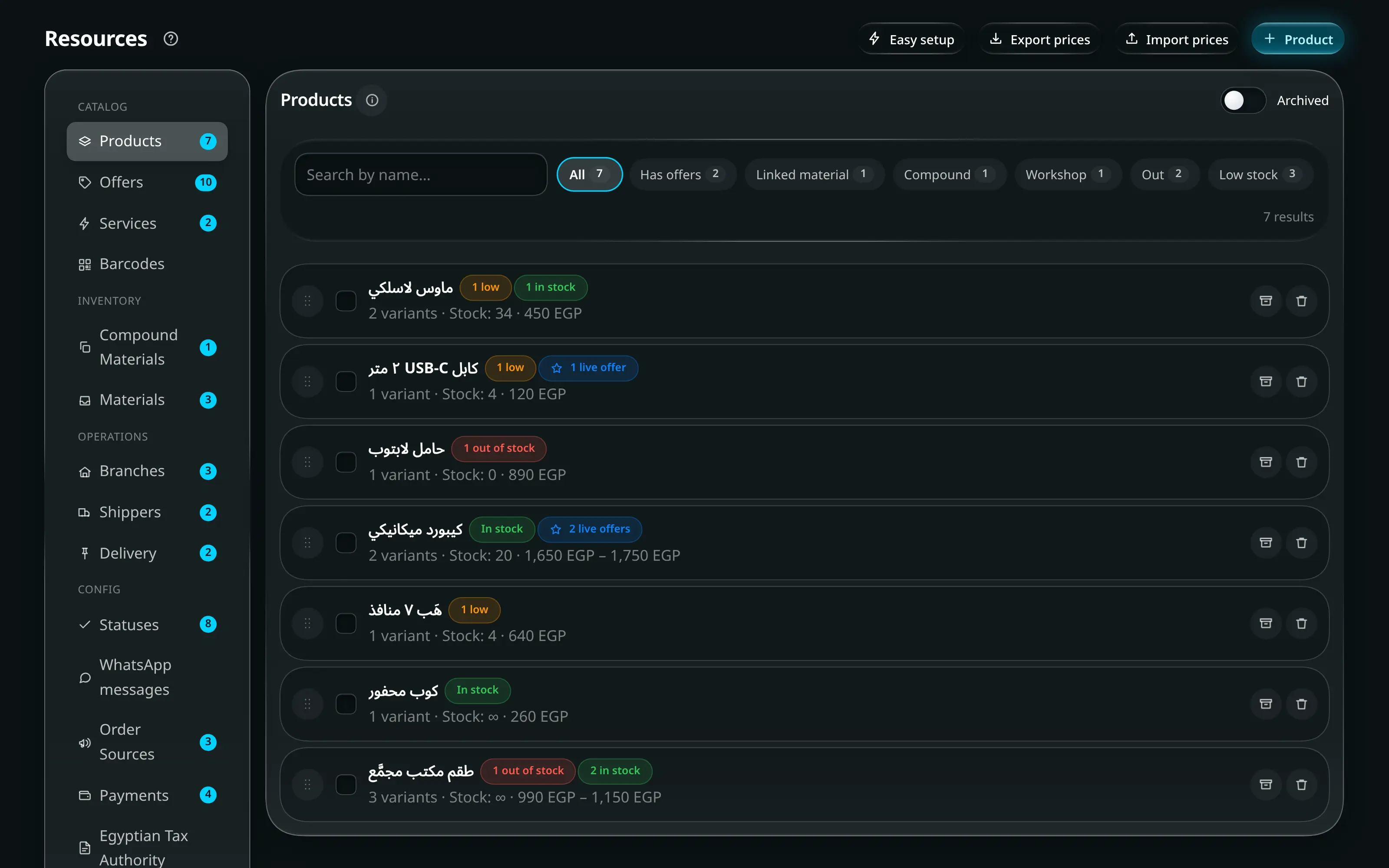
Resources. The tool list runs down one side; the tool you picked fills the rest.
Numbered on the screenshot
- 1The title, and the name of the tool you are inside.
- 2Easy setup, with the steps still open, and the add button. Its label names what this tool creates — “+ Product”, “+ Branch”, “+ Method”.
- 3Search inside the open tool.
- 4The toolbar, including the show-archived toggle.
| Group | Tools |
|---|---|
| Catalog | Products · Offers · Services · Barcodes |
| Inventory | Compound Materials · Materials |
| Operations | Branches · Shippers · Delivery |
| Config | Statuses · WhatsApp messages · Order Sources · Payments · Egyptian Tax Authority · General Settings |
Each tool carries a live count of its non-archived records, an i button that folds out what the resource is and the few consequences that are invisible from its list, and a Show archived toggle.
Catalog
Products
The catalogue item you sell in the shop and in the online store. A product has variants, and a variant is what actually carries stock, a price and a barcode.
| Worth knowing | |
|---|---|
| Stock source | A variant’s stock can be its own count, a material, or a recipe of components |
| Cost | A single number, or a recipe that computes it |
| Bulk actions | The editor header sets prices, applies a cost or margin, or puts every variant on offer at once. On a phone Set prices stays and the rest sit under Actions |
| Excel | Export prices, edit them in a spreadsheet, and import them back |
| Offers | An offer price runs between two dates and applies on top |
| Per variant | Barcodes, low-stock limits and customisation fields |
Offers
Two kinds of offer live under one tool, on two tabs:
- Item offers — a discount that rides on one product variant. Retail and wholesale get their own discount; leave one blank and it does not apply. Dates are optional, and outside its dates the offer simply does not run. A campaign puts one offer across any number of items at once.
- Bundle offers — a fixed-price basket of catalogue items sold as one thing.
Services
Work you charge for that holds no stock — design, delivery labour, a repair.
Cost feeds the profit figures; leave it at 0 when there genuinely is none. A workshop service is routed to its workshop and creates a job when the order saves. Services can carry customisation fields, exactly like products.
Barcodes
Generates, looks up and prints barcodes. Generate assigns a unique code to a variant; Add takes one you already have.
Label size, gaps and columns are set once and remembered. Sheet mode prints A4 pages; roll mode prints to a thermal label printer. The preview is drawn by the same code as the print, so what you see is what comes out.
Inventory
| Tool | Is |
|---|---|
| Compound Materials | Something bought by the pack and used piece by piece. Cost per item = pack cost ÷ pieces per pack, derived rather than typed |
| Materials | Bulk stock measured in your own unit — fabric, ink, thread. Average cost per unit is built from your receipts |
Quantities for both are received and counted in Inventory, not here. This tool defines what they are.
Operations
Branches
A selling location with its own stock, cash drawer, staff and order numbering.
| Field | Effect |
|---|---|
| Branch code + next number | Build every order number |
| Promised days | Decide when an order is flagged late |
| Colour | Tags this branch across orders, cash and reports |
| Address, phones, map pin | Print on invoices and show in the online store |
Safes are defined per branch here too — they are what Cash Registry reports balances for.
Shippers
A company that carries your orders to other governorates.
- Commission % is what the company keeps out of a cash-on-delivery collection.
- A rate card can be imported from the company’s own Excel file, or entered by hand, governorate by governorate. This is what auto-fills the shipping price in Add Order.
- Upload the courier’s export template once and the app fills their own spreadsheet for you.
- What each company owes you is settled in Shipping & Delivery — on the Basic package, which has no such screen, it is settled with each order instead.
Delivery
Your own couriers — the people who hand-deliver locally. They live in the same list as shipping companies, flagged as a delivery service, and are picked on a delivery-type order. Archive one who left rather than deleting them.
Config
Statuses
A step an order moves through, plus the rules for which orders are allowed to be in it.
| Setting | Does |
|---|---|
| Stage | Groups the status into Processing · Ready / In transit · Delivered / Settled · Returned / Cancelled |
| Allowed order types | Hides a status from orders it cannot apply to |
| Content rules | Limits a status to orders containing workshop items, or services, or similar |
| WhatsApp message | The message offered when an order reaches this status. Edit this message opens it in WhatsApp messages |
| Order | Drag to reorder, or use the Workflow tab to move statuses between stages |
WhatsApp messages
Every WhatsApp message Joey Cash writes for you, in one list: order confirmation, each status’s own message, the customer-profile messages (Say hello, Balance reminder, Wallet credit, Occasions form link), the Advisor’s offers, the online-store follow-ups and the courier payout request. Open one to change its words, and every screen that sends it uses your version — there is no second copy to keep in step.
The builder has the same parts wherever you meet it:
-
Variables as tags. Tap Customer name, Total and so on to add them, and they are filled in for each customer. A tag you typed that is not a variable here —
{'{'}customerNmae{'}'}— is named under the box, because it would be sent exactly as typed. -
Formatting — B I S and monospace — writes WhatsApp’s own marks (
*bold*,_italic_,~strike~). -
A preview drawn like a WhatsApp chat, with example details, so you see the message as the customer will: bold as bold, lists as typed, the time and ticks.
-
Start from: ready-made wordings (Standard, Friendly, Formal, Short, and ones for a specific status), and Back to standard to drop your own wording.
-
Two languages. العربية / English beside Wording in switches between the message’s Arabic and English versions. Each customer is sent the one in their language — the customer’s own WhatsApp messages in setting, or the language you last wrote to them in. A message written before there were two versions counts only for the language it is written in.
-
A discount code. Pick one of your store’s codes under Discount code in this message (or No code), then use Discount code, Code discount and Code valid until. They are filled only while the checkout would accept the code: switched off, ended, not started or used up, and they stay empty. The note under the picker also says what the code will check that a message cannot (new customers only, a minimum order, shipping or chosen items only).
-
A line whose detail is empty is left out of what is sent — no Remaining: 0, and no code line when there is no code.
-
Preview with Example details or A real one — pick one of your own orders or customers — and as the Chat or the Lock screen notification the customer sees first.
-
Earlier versions and how they did, under the preview. Every saved wording is listed with when it was saved and by whom; Restore puts one back in the editor (it is used once you Save). For offers and follow-ups each version also shows Sent to n · m ordered within 14 days (p%) — an order counts when the same phone orders within 14 days of the message, and cancelled and returned orders do not count.
Write with AI
Write with AI writes the request for you in three steps: say
what you want (tone, language — Egyptian, Standard or English — and anything to
mention), Copy request or pick ChatGPT, Claude or Gemini to copy
it and open the chat, then paste the answer back and Use this message.
The request already tells the AI which message it is writing, who receives it, the
current wording, and every tag it can use with an example — so the answer comes back
with the right {'{'}tags{'}'} in it. Joey Cash finds the message inside the whole
answer, and lists any tag it cannot fill before you use it.
Write it for me Pro. On a Pro shop, an admin can connect the shop’s own AI key and then press Write it for me in step 2: Joey Cash sends the same request from your shop’s own server and puts the answer in step 3, with nothing to copy or paste.
- Connecting a key. Connect a key — in step 2, or at the top of WhatsApp messages — lets you pick Claude, ChatGPT or Gemini and paste that company’s API key. Check and save asks the company whether the key works before keeping it, and picks its low-cost model for you. Afterwards the screen shows only which company and the key’s last four characters; Change key or Disconnect any time.
- It is paid, by your shop, to that company. Every message the AI writes is charged to your shop’s own account there — usually less than one US cent a message. Joey Cash does not charge for it, cannot see that bill and cannot top it up. A ChatGPT Plus or Claude Pro subscription is not an API key: the API is a separate account with its own credit.
- Getting a key. How to get a key walks through each company step by step and opens its key page. Set a monthly spending limit on that company’s site too.
- A daily cap. It stops after a set number of requests a day, so a stuck button cannot run up a bill. Step 2 says where you stand: Up to 60 AI messages a day, to protect your shop’s bill. before your first request, then AI messages today: 12 of 60 after each one (the day is Cairo time). Without a key, or once the cap is reached, the free copy route above still works.
- “Your key has reached its usage limit for now.” This is the AI company’s own limit, not Joey Cash’s, and it is what a free key (Gemini’s free tier, for example) hits first: a small allowance per minute and per day. Wait a minute or try tomorrow; turning on billing with that company raises it. It is different from no credit, which means the paid account needs topping up.
Order Sources
Where an order came from — a walk-in, Facebook, WhatsApp, the online store. Name only. It is picked on the order screen and reported on in Customers and the Dashboard. Archive a channel you stopped using rather than deleting it.
Payments
A way a customer can pay you — cash, a wallet number, a bank account, a card machine.
| Field | Effect |
|---|---|
| Number / ID | What whoever takes the payment reads out — the wallet number, the account |
| Admin only | Hides the method from employees |
| Show in online store | Offers it at the storefront checkout |
| Available in | Limits the method to certain branches. None selected means everywhere |
Egyptian Tax Authority
Optional, off by default, and marked Preview in its own head. It holds the seller identity and the per-branch device and address details that an ETA tax invoice or sales receipt has to print. Nothing else in the app changes shape because of it.
Enable ETA tax documents is the whole switch, and it starts off. Turning it on adds the ETA presets, the tax controls and the ETA QR option to Print studio; turning it back off hides them again and keeps every identifier you saved here. Filling in a legal name or a branch code does not switch it on by itself — only the switch does.
| Field | Effect |
|---|---|
| Registered legal name + Tax registration number (RIN) | Identify the seller on an ETA tax invoice or receipt. The RIN must be nine digits; separators are removed when you save, and a number that is not nine digits is refused |
| Tax activity code | The seller’s registered ETA activity |
| Syndicate licence number | Optional |
| Default tax treatment + VAT rate % | Captured onto each new order as it is written. Older orders that never captured one fall back to the current setting at print time |
| ETA environment | Which ETA portal the printed verification QR points at — Production, or Preprod (testing). Leave it on Production unless this shop is testing an integration; a production QR does not resolve in the test portal, and the other way round |
| Per branch: ETA branch code + POS device serial number | Identify which registered device and issuing branch produced the document |
| Per branch: governorate, region/city, street and building number | The structured seller address ETA requires. Addresses are recorded for Egypt (country code EG); postal code, floor, room, landmark and extra details are optional |
The QR itself follows the template published in the ETA’s integration SDK
({portal}/receipts/search/{UUID}/share/{date and time}#Total:{total},IssuerRIN:{RIN}),
so scanning a printed receipt opens that receipt on the ETA portal. Because every part
of it has to be exact, the app prints no QR at all rather than a QR that would
resolve to nothing — if the RIN is not nine digits, the UUID is not 64 hexadecimal
characters, or the order has no recorded issue date. Print
studio names the missing piece before you print.
General Settings
Store-wide settings shared by the POS, the printed documents and the online store.
| Setting | Effect |
|---|---|
| Store name, slogan and logo | The trading identity used by ordinary prints and the online store |
| Order confirmation message | The default WhatsApp message for a new order, and the fallback for any status without one of its own. Its words are edited in WhatsApp messages |
| Privacy PIN | Unlocks hidden figures. Administrators and employees have separate PINs |
| Main warehouse | Adds a stock location above the branches |
| Security | Where the employee-view shortcut is remapped |
Customer programmes
Two blocks under General Settings switch the customer programmes on and decide who is in them. Both are off until you turn them on.
| Block | |
|---|---|
| Customer occasions | Birthdays and anniversaries on the customer profile. Off until you turn it on; turning it off keeps every record. The occasion list, reminders and the customer form are Pro |
| Loyalty points | Points and tiers from what customers spend. A customer outside the programme keeps their points, frozen, until they are back in. |
Each block’s switch sits at the end of its title line — the title is what it turns on. Below it, each has Who takes part:
| Choice | Who is in |
|---|---|
| All customers | Everyone |
| Some groups | A customer in ANY of the ticked groups takes part. Pick from Customer state, Customer type (Retail / Wholesale) and Tags |
| Enrolled one by one | Only customers enrolled from their own profile take part. |
Whatever you choose here, a single customer can be set to Always in or Always out on their own profile — see Customers → Programmes.
While a programme is switched off, the block is just its title and switch; switching it on shows its settings.
Count orders — loyalty points only:
| Choice | What counts |
|---|---|
| All orders ever | Every order the customer has placed |
| From today | Orders from today on |
| From a date | Orders from the Start date on. A past date counts the orders already placed since then. A future date starts the programme on that day. |
An order before the start earns no points and does not count toward a tier. Points already redeemed stay redeemed, so moving the start later can leave a customer’s balance below zero.
Loyalty rates and tiers Pro — administrators only. A fold inside the loyalty card; closed, it reads 1 point per {spend} · {pts} points = {money}. It opens by itself if a value in it is refused when you save.
| Field | |
|---|---|
| Spend per point (EGP) | A customer earns one point for every this much they spend. |
| Points redeemed… / …are worth (EGP) | What points are worth as a discount |
| Smallest redemption (points) | Below this, points cannot be redeemed |
| A table: Tier · From spend (EGP) · Points × | One row per tier; Bronze always starts at 0 |
Two habits
- Set up branches, payments and statuses before your first order. Every one of them is stamped onto orders as they are written, and changing them later does not rewrite history. Easy setup walks you through all three.
- Read the i panel once per tool. It is short, and it states the consequences that the list of fields cannot show you.