
- Where it is
- Home
- Shipping & Delivery
- Who can open it
- EveryoneEveryone. An employee gets Needs attention and Delivery; the Shipping tab — the inter-city companies — is administrator-only, and their Needs attention lists delivery couriers only.
- Tabs
- Needs attention
- Shipping
- Delivery
- What it writes
- A settlement against each selected order
- One cash registry entry per settlement — income when they pay you, an expense when you pay them
- The courier’s running balance
Shipping and delivery are one screen
They are stored as one collection and split by a single flag, so they share one balance calculation, one profile and one settlement. The tabs state the difference in words rather than making you infer it:
| Tab | Scope |
|---|---|
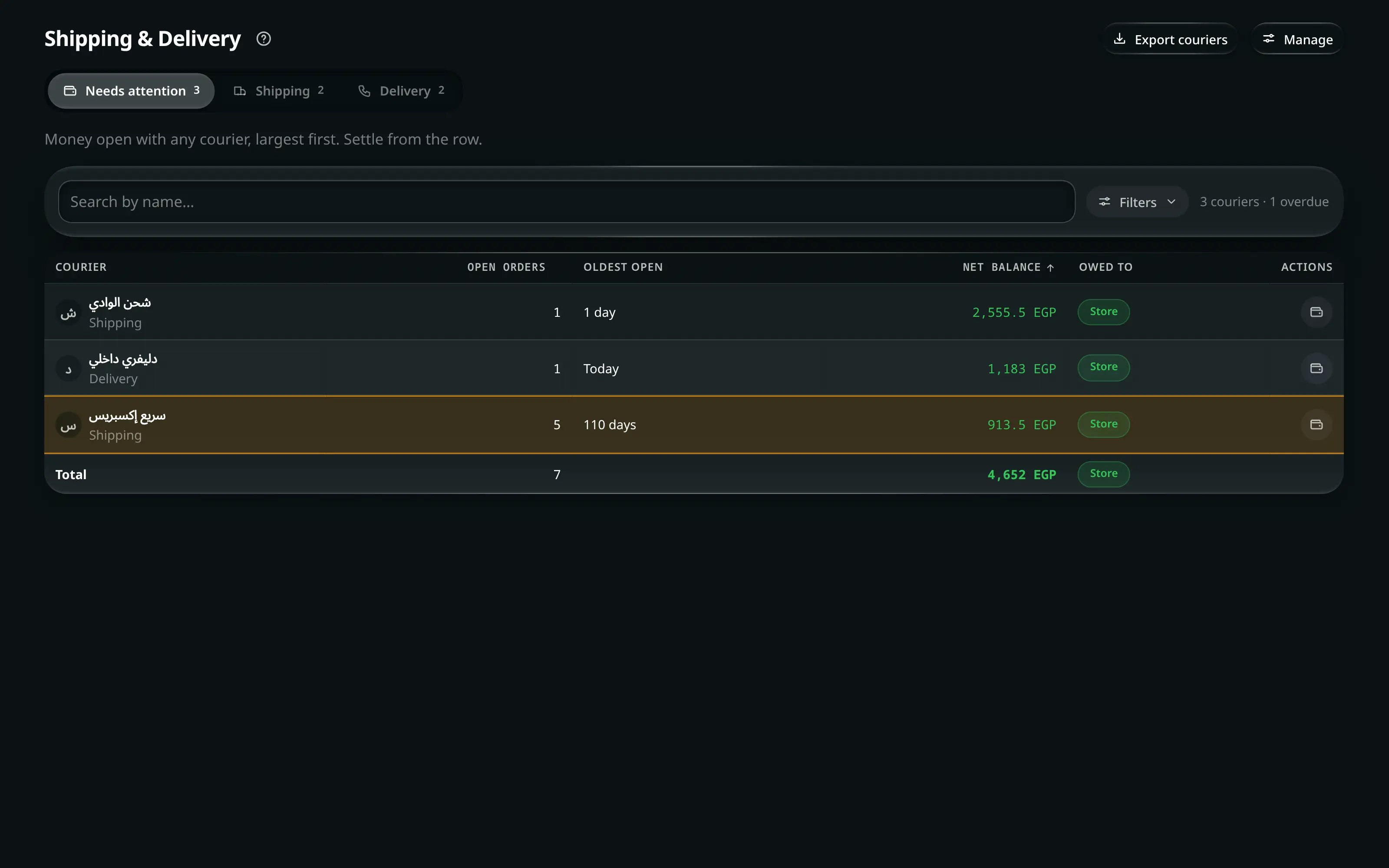
| Needs attention | Money open with any courier, largest first. Settle from the row. |
| Shipping | Inter-city companies, each with its own governorate prices. Administrator-only |
| Delivery | Same-city couriers, one flat fee per order. |
Reading the list
| Column | Means |
|---|---|
| Courier | Their name |
| Open orders | How many are unsettled |
| Oldest open | The age of the oldest — a courier at 40 days is a different problem from one at 2 |
| Net balance | How much is open |
| Owed to | Which side the balance runs to — Store or Courier |
| Actions | Settle and |
On a phone each courier is a card with the same three figures and the same two buttons.
Overdue couriers
A courier whose oldest open order has waited more than 7 days (delivery) or 14 days (shipping) is overdue: its row or card carries a warning edge, hovering the age says Money open for longer than …, and the results line counts them — 3 couriers · 1 overdue. Shipping gets longer because an inter-city parcel takes longer to come back as cash.
A balance runs in one of two directions, and the screen names both:
- Due to store — they collected cash for you and have not handed it over.
- Due to courier — their fees exceed what they are holding.
- Cancels out — both sides reach the same total. Settling them books no money at all.
Filter by Owed to (Everyone · Store · Courier · Settled), by Min. balance, and by Shows (All couriers · Has open orders). Press a heading to sort by it; with more than one courier on screen, the list ends with a totals row (on a phone, a totals card under the last courier).
Settling with a courier
- Home
- Shipping & Delivery
- a courier row
- Settle
Or open the profile first if you want to see the orders before deciding.
The panel splits the balance into its parts, and the words are the app’s own:
Line Means Cash they collected Money the courier took from your customers Fees & commission What you owe them for carrying it Net outstanding The difference, labelled In the store’s favour or In the courier’s favour Two lists show the orders behind each side — They owe the store and The store owes them, each with the amount right after the order number — and a closed Settled history fold holds what is already done.
Two ways, and the panel offers both:
- Settle everything — everything open with this courier. It states Receiving … and Paying … before the button, and says they balance — no money changes hands when the two cancel out.
- Tick individual orders and press Settle selected. Use this when the courier is handing over part of what they hold.
Branch / safe — which branch’s safe receives the cash, or pays it out — and Payment method. The receipt at the top of the dialog reads the result back before you confirm: how many orders, the safe, and Receiving … or Paying … with the amount. There is no amount to type — it is the sum of the ticked orders.
Orders that cancel out
When a courier’s collections and fees are identical, the app offers to close both sets in one action — These orders cancel out exactly … settling them books no money at all — with Settle both sets. It is bookkeeping, not a payment.
Undoing a settlement
on a row in Settled history reverses it — the orders go back to open and the cash entry is reversed.
A manual entry
Manual entry records a settlement that has no orders behind it — a courier paying off an old balance, a fee agreed outside the order flow. It asks for the Transaction type (Incoming — courier pays the store or Outgoing — store pays the courier), the amount and the safe.
Where the amounts come from
Nothing on this screen is typed into it. Each figure originates in an order:
| On the order | Becomes |
|---|---|
| Shipping company collects / Delivery driver collects in Add Order | The courier is recorded as holding that money |
| A settlement done from Current Orders without ticking collected now | The amount stays on the courier’s balance to be reconciled here |
| The shipping price on the order, against the company’s own rate | The fee side of the balance |
That is why Current Orders tells you, in those words, settle it in Shipping/Delivery when an order’s money belongs to a courier rather than to the till.
Statements, exports and contact
The profile’s action row, beside Manual entry:
| Button | Gives you |
|---|---|
| Send statement | A WhatsApp message with the open account — orders open, what each side owes, the balance and the oldest open order. It opens the usual send sheet, so you read and edit it first; the wording is yours to change in Resources → WhatsApp messages (Courier statement). Only when the courier has a phone number |
| Print statement | A printable page: every open order they owe the store, every one the store owes them, a subtotal under each, and the net — the page to hand over when a courier disputes a number |
| Export statement | The same ledger as a spreadsheet, with what is already settled |
| Call | Dials the courier’s number. Only when they have one |
On a phone, Manual entry stays on the row and the rest fold behind Actions.
On the list itself, Export couriers gives you the list as a spreadsheet.