
- Where it is
- Home
- Today
- Daily cash drawer
- Who can open it
- EveryoneEmployees see this screen; some actions inside it are still admin-only.
- What it writes
- A settlement sent for review — no money moves until an administrator approves it
- A confirmed opening balance, and any opening variance, written to the safe immediately
- An expense request, waiting for approval
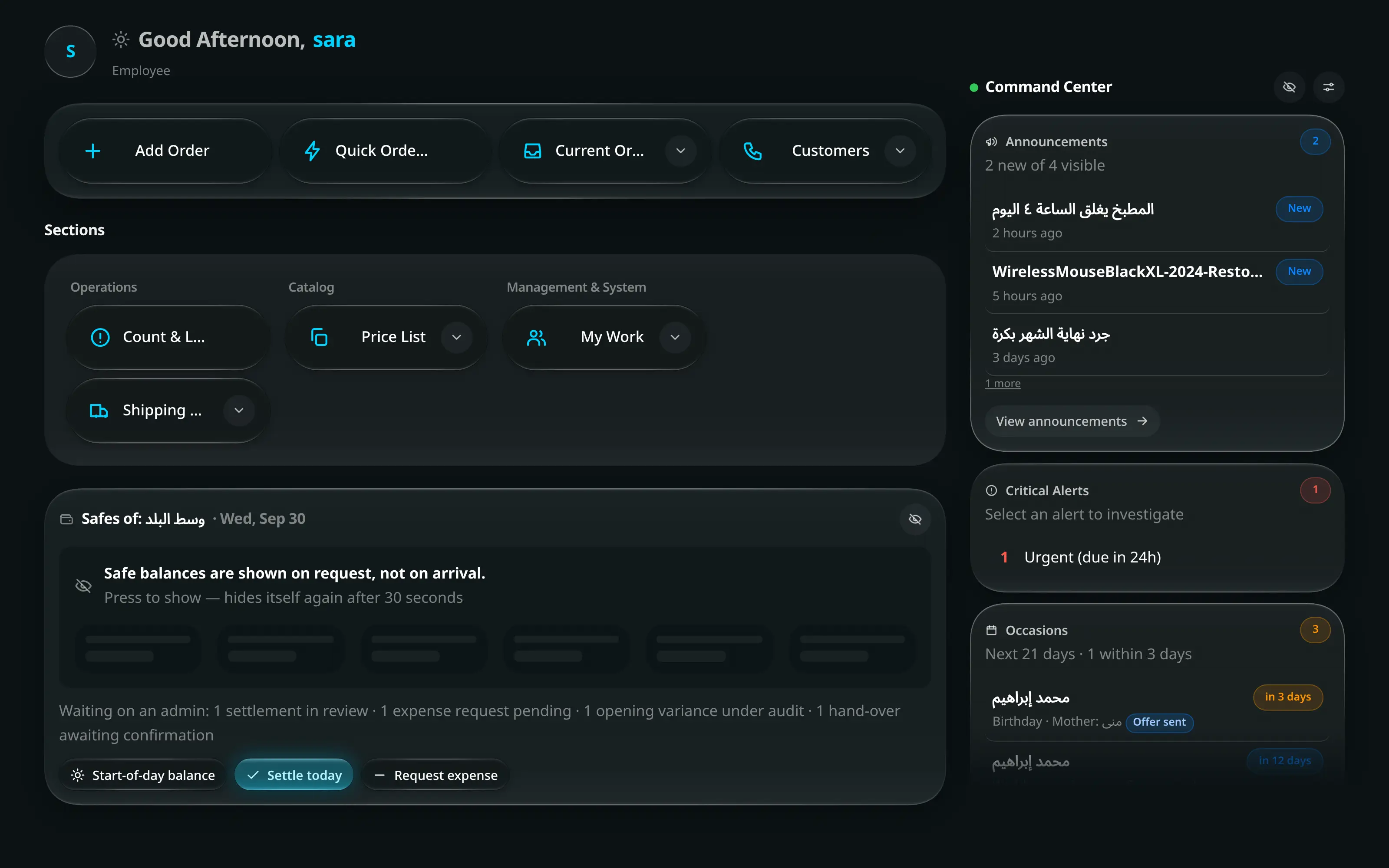
This is the one money screen an employee works on every day, and it is not Cash Registry — that screen is where an administrator reviews what you send. Your side of it is a card on the home screen, under Today.
What the card is telling you
The title names the branch and the date — Safes of … — and the eye beside it hides every figure on the card for as long as someone is standing at the counter.
| Figure | Is |
|---|---|
| Opened with | The balance the day started on |
| Took in | Everything that arrived today |
| Paid out | Everything that left today |
| Expect on hand now | What should physically be in the safes right now |
Under those, one row per safe. Safes holding nothing are folded into a … safes are empty summary rather than padding the list.
Two things appear only when they have something to say.
Waiting on an admin is a line of text: settlement in review · expense request pending · opening variance under audit · hand-over awaiting confirmation. That is work you have already sent, not work waiting on you.
The band across the top of the card is at most one — never two — and on an ordinary day that is going normally there is none at all:
| The band says | It means |
|---|---|
| Today’s close is with an admin | You have sent today’s close. It carries who sent it, the total counted, and no cash moves until it is approved |
| Today is closed | An administrator approved it, for this branch |
| Today’s close was returned | Your close came back instead. It carries who returned it, their reason, and count again and send it |
| Not settled for … days | The last close was that long ago, with its date and who sent it |
| This branch has never been closed | Everything below has been accumulating since the branch opened |
Closing the day
Settle today on the drawer card.
Once the close is sent the button says Settlement pending, and Day settled once an administrator has approved it. Either way it does nothing — it stops being the lit button on the card rather than staying lit and refusing.
One box per safe. Type what you can see, not what you expect.
An empty safe is confirmed with a 0, not skipped — the panel at the bottom counts you down: 3 of 5 safes counted · Enter what you can see in each safe — an empty one is confirmed with a 0, not skipped. Nothing is sent until they are all filled in.
Count in stacks, if that is how you countoptionalاختياري
Count the notes instead under a cash safe opens a pad with a row per denomination — 200, 100, 50, 20, 10, 5, 1.
It adds into the amount box rather than replacing it, and shows its own total as Counted from notes. The box stays the one number that gets sent, so a pad you abandon half-way cannot leave a stale total behind it.
If the shop counts blind, check before you sendoptionalاختياري
With Blind cash counts switched on for the shop, each row reads Expected — hidden and no verdict appears while you type. The button says Check the count, and pressing it reveals the expected balances beside what you counted — Ready to check · the expected balances are still hidden. Checking reveals them beside what you counted.
Pressing it a second time is what sends. It is a step, not a switch you can flip back and forth while counting.
Per safe: Matches, or Short / Over with the difference and the arithmetic beside it.
At the bottom, one sentence for the whole count:
It says It means Everything matches The close is sent for review with no variance on it. 2 safes don’t match — short by … The counted amounts and every variance go to an admin for review. No cash moves until it is approved. One safe has an amount that cannot be counted enter the amount you can see, as a number that is not negative. Notes — anything the admin should know about a variance — then Send for review.
After you have sent the close
The safe balances keep showing, and that is deliberate. Sending a close does not move the money — the notes are still in your safe and you are still accountable for them, so a card that blanked itself would be telling you the drawer was empty when it is not.
What the card does instead is say where it now stands:
- The band at the top reads Today’s close is with an admin, with who sent it, the total counted, and no cash moves until it is approved.
- Any safe whose balance has moved since you counted it carries its own line — moved since the close with the difference — because a sale rung up after the count is exactly the gap an administrator will otherwise ask you about.
- A safe holding money that was not in the close at all is marked Not in the close — it was opened after you sent, or it was skipped — because an administrator is otherwise about to approve a total that does not include it.
- A safe that still agrees with what you counted is marked with nothing at all.
If the close comes back
An administrator can return a close instead of approving it — a figure that needs a receipt behind it, a safe that was skipped, a count that does not look right. Nothing is booked when that happens, so there is nothing to unwind: the day simply goes back to being open.
The card says so in a red band: Today’s close was returned, with who returned it, their reason in their own words, and what to do about it — count again and send it.
- Settle today is lit again, because the day genuinely is not closed. It is the same dialog; count and send as before.
- The reason is a sentence the administrator typed, not a code. They cannot return a close without writing one.
- The band stays up until you send a new close for today, and then it is replaced by Today’s close is with an admin again.
Confirming the opening balance
Start-of-day balance is the same dialog with a different verb, run at the start of the day instead of the end.
The difference is what happens to a variance. Closing sends everything for review and moves nothing. Opening writes each variance to its safe immediately — each variance is written to the safe now, so the drawer matches the cash in front of you, and is sent for audit — because a drawer that disagrees with reality from the first sale of the day gets worse all day.
Where it matches, no cash moves: the opening balance is confirmed. No cash entry is written. The count itself is still kept, so the shop knows the day was opened.
Each branch is opened once per day, by whoever counts first. After that the button reads Day opened · 8:05 AM, with the time of the count, and it no longer opens anything; hover it to see who counted. If a colleague opened the branch while your dialog was open, saving says This branch’s day was already opened by them, and nothing of yours is written.
Asking for money out of a safe
You cannot take money out of a safe. You ask, and it waits.
Request expense on the drawer card.
It opens with the fact stated first, before any field: This asks for the money — nothing leaves the safe until an admin approves it.
Field Amount · Reason Required, both Branch Which branch the money is for Preferred payout branch · Preferred payment method Optional — where and how you would like to be paid Send request, and the card starts reporting expense request pending on its waiting line until it is answered.