
- Where it is
- Home
- Customers
- Who can open it
- EveryoneEveryone. Profit, moving wallet money, adjusting loyalty points, programme overrides, delete, merge, block and changing a phone number are administrator-only. Occasions and redeeming points are Pro.
- Tabs
- Directory
- Receivables
- Wallet credit
- Insights
- Occasions
- Loyalty
- What it writes
- The customer record: name, addresses, wholesale flag, tags, notes
- Wallet balance movements, with a matching cash registry entry
- A pay-later balance
- A merge: every order link, address, tag and note moved onto one record
- A block, with its reason
- The date each contact was exported, on the customer record itself
- New customers from an imported contacts file — name, phone and the wholesale flag; existing customers are never changed
- Occasions on the customer record: whose, the relation, the kind, the date, whether it repeats, a budget and notes
- An occasion's outreach status — separately for each year it comes round
- The private link of the customer form, on the customer record; replacing it retires the old one
- Loyalty adjustments, with their reason, and redemptions — a redemption also adds its value to the wallet
- A customer's programme override: in, out, or following the shop's setting
Six views, six different questions
| Tab | Answers |
|---|---|
| Directory | Who are my customers? |
| Receivables | Who owes me, how much, and how old is it? |
| Wallet credit | What do I owe them in prepaid credit? |
| Insights | Which customers are worth acting on? |
| Occasions Pro | Whose birthday or anniversary is coming up, and has anyone been in touch? |
| Loyalty | Who holds points, what are they worth, and who can redeem them now? |
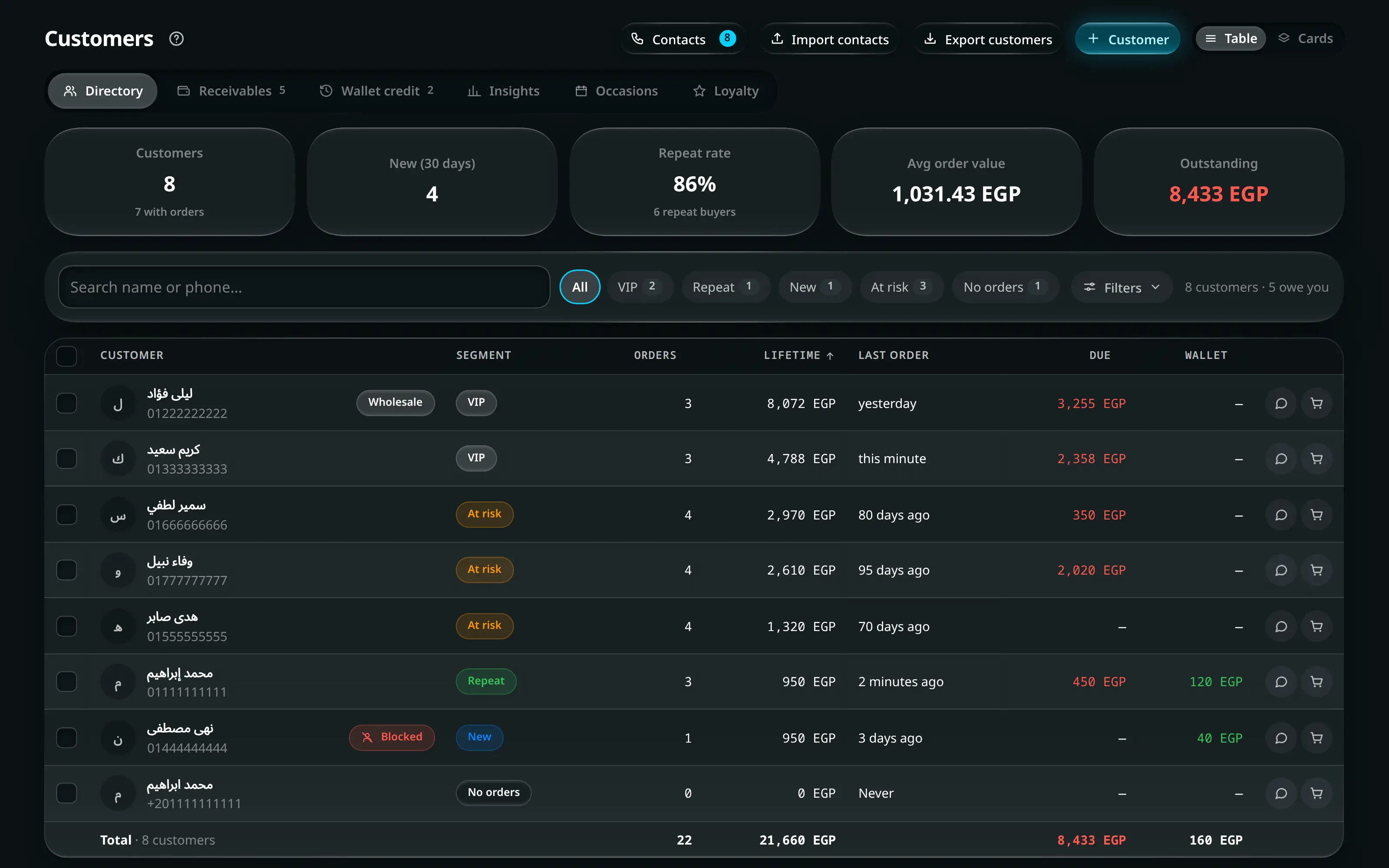
Numbered on the screenshot
- 1The views. Each is a different question, not a filter on one list.
- 2Search by name or phone. A near miss still matches, and Arabic-Indic digits are handled.
- 3Filters — segment, type, tags, and the aging buckets on Receivables.
- 4Contacts export, contacts import, customer export, and the button that adds a customer.
Directory
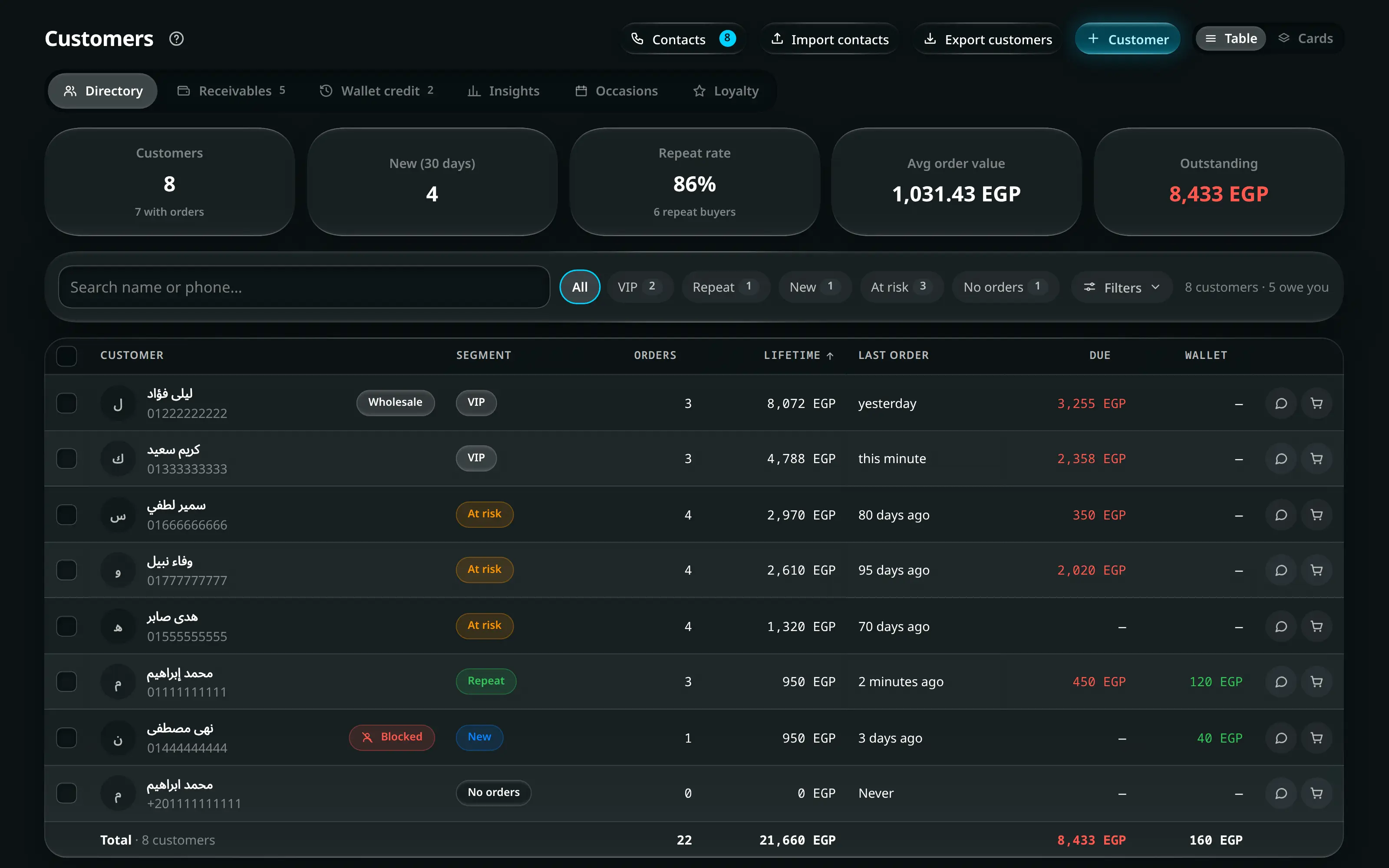
The list, with each customer’s order count, total spend, outstanding balance and segment.
Search matches name or phone, tolerates a near miss, and normalises Arabic-Indic digits — so a number typed either way finds the same person. Filter by type (retail or wholesale), by segment, or by tag.
Press a heading to sort by it — name, orders, spend, balance or last order — and the sort applies to every customer the filters let through, not to the page in front of you. The list ends with a totals row: how many customers were counted, their orders, their spend and what they still owe, all for that same filtered set.
Segments
A customer is in exactly one segment, and recency outranks value:
| Segment | Means |
|---|---|
| VIP | In the top fifth of paying customers |
| Repeat | Has bought more than once and is still active |
| New | Recently first bought |
| At risk | Used to buy regularly and has gone quiet |
| Dormant | Long gone |
| No orders | On the list, never bought |
Receivables
Everyone who owes you, aged into Current · 30 · 60 · 90 days, with the total and the count of customers owing at the top.
Aging is what turns “we are owed a lot” into “we are owed a lot from March”, which is a different conversation with a different person.
Wallet credit
The other direction: prepaid credit customers hold, which they can still spend. The screen labels it as what it is — Credit you owe — with Prepaid credit customers can still spend under it, and the number of holders.
Insights
Segments and their sizes, top customers, Slipping away (Bought before, quiet since), spend across twelve months, geography, and duplicates.
Occasions Pro
Only there once Customer occasions is switched on in Settings — it is off until you turn it on.
Every occasion your customers have told you about, soonest first, over the window you pick: 7 · 14 · 21 · 60 days. Each row has the customer, the person the occasion is for, the date, how many days away it is, the budget, and where the outreach stands. Search by customer, phone or the person’s name; Filters narrows by status, by kind of occasion, by relation, or to Has a budget.
Two actions on each row: Send offer opens the WhatsApp message for you to read and edit first, and New order starts an order for that customer.
Where the outreach stands
| Status | Means |
|---|---|
| Not contacted | Nobody has been in touch yet |
| Offer sent | A message went out — sending one from the app sets this for you |
| Interested | They replied and want something |
| Not interested | Not this time |
| Ordered | They bought for it — you can link the order |
Reminders
Every morning at 09:00 Cairo time the app checks what is coming up and reminds the shop — a notification in the bell and a push to your devices — when an occasion is 21, 14 and 7 days away. It reminds only while the status is Not contacted or Interested; once someone has sent an offer or the customer has ordered, it stops. A blocked customer is never reminded, and neither is one outside the programme.
Loyalty
Only there while loyalty is switched on in Settings. It is on every package, because the points come from the order book either way; only redeeming them is Pro.
Every customer the programme has touched, most points first. Four figures sit at the top:
| Figure | Means |
|---|---|
| Points outstanding | Every point customers hold, worth {money} — what the shop owes in rewards |
| Members | How many customers are on the list. Under it, {n} frozen when any are — otherwise Counting orders since {date}, or Starts {date} while the start date is still ahead |
| Can redeem now | Customers holding enough to redeem, from {n} points. Press it to see just them |
| Points redeemed | Everything already turned into wallet credit |
Search by name or phone; Enter opens the first match. The chips narrow the list by tier — All · No tier yet · Bronze · Silver · Gold · Platinum, each with its count, and only the tiers someone is in. They appear once customers sit in more than one tier. Filters holds Shows: Everyone, Can redeem or Frozen (not enrolled). The results line says how many customers are listed and how many of them can redeem.
The table’s columns are Tier, Points, Worth, Next tier — a bar with {money} to {tier} under it, or Top tier — Counted spend and Last order, with a totals row at the foot. On a phone each customer is a card with their points, what they are worth, their last order and the bar.
Press a row to open that customer’s Wallet tab. Two row actions: Pro Redeem to wallet, which stays off until the customer has enough points, and WhatsApp. Export customers in the header exports this list — tier, points, worth, next tier, spend still to go, counted spend, last order, and whether the points are frozen.
The customer profile
Open any row.
| Section | Holds |
|---|---|
| Identity | Name, phone, since when, segment, tags |
| Addresses | The address book, as saved from order forms |
| Orders | Their whole history, with an export |
| Occasions | Their family dates and the customer form — while occasions are switched on |
| Wallet | Balance and movements, and their loyalty points. Under the points, Starts {date} while the programme’s start date is still ahead, or Counting orders since {date} once it has passed |
| Pay-later | What they owe |
| Notes | Something the next person serving them should know… |
Tags are shared across the shop and filterable — 24 characters or fewer, and no
. $ # [ ] /.
Edit customer also holds WhatsApp messages in — Automatic, العربية or English. Every WhatsApp message to this customer is sent in that language’s version; Automatic uses the language you last messaged them in. Each message’s two versions are written in Resources → WhatsApp messages.
Occasions on the profile
Add occasion asks: Whose occasion · Relation to the customer · Occasion · Month · Day · Year · Repeats (Every year or Once) · Expected budget, and notes. The year is optional for an occasion that repeats — it is what lets a birthday say how old they turn — and required for one that happens once.
Change status sets where this year’s outreach stands. Anyone can add, edit and change the status; deleting an occasion is administrator-only.
If the customer is outside the programme, the tab says Not enrolled: the dates are kept and can still be edited, but they are not in the reminders or on the dashboard.
The customer form Pro
Customer form is a private link where the customer adds their own family dates — no account needed. Create link makes it; then Copy link, Show QR (with Save image and Print for the counter) and Send on WhatsApp.
It needs the online store, because the form is a page of it.
Loyalty points
The Loyalty card on the Wallet tab shows the customer’s points, what they are worth, their tier (Bronze · Silver · Gold · Platinum) and how far the next one is. Points and tier come from the customer’s own orders.
Pro Redeem to wallet turns points into wallet credit, and Adjust points adds or removes them — with a reason, because a correction without a reason cannot be checked later. Adjusting is administrator-only. At the counter, points can also be taken off an order in Add Order.
A customer outside the programme keeps their points, frozen: they stop earning and cannot be redeemed until they are back in.
Exporting contacts to your phone
- Customers
- Contacts
Built for one specific job: getting your customer list into WhatsApp so you can broadcast to them — without exporting the same people twice.
The dialog leads with the count — how many contacts this file will contain — and the controls that change it under it.
Skip already exported carries its own count beside it. The export date is stored on the customer record, not in this browser, so a second phone does not re-export everyone and clearing your browser does not lose it.
Add to each contact name prefixes every contact with your shop’s name. An address book sorts by name, so 300 customers filed under their own names are indistinguishable from your personal contacts; a prefix files them together and makes them removable in one pass.
A .vcf, not a CSV — iOS cannot import contacts from a CSV at all, and Android’s route goes through a Google account.
Numbers go out in international form, because that is how WhatsApp matches a saved contact to an account. A local
01…number in an address book matches nobody once that phone is on another network.Duplicates are collapsed by the resolved number —
01111111111and+201111111111are one person — and both records are marked as exported, because both of them were.The dialog spells the steps out:
- Send the downloaded
.vcfto yourself — WhatsApp to your own number works. - Open it on the phone and confirm the import.
- Open WhatsApp and pull down on the chat list to refresh.
- They are now selectable in WhatsApp, including for a broadcast.
Importing the same file twice does not create duplicates on the phone.
- Send the downloaded
Importing contacts from a phone
- Customers
- Import contacts
The other direction: turning the contacts already on your phone into customers, so a shop that has sold for years does not start from an empty list.
The dialog’s Getting the file from a phone panel shows the route for each phone:
Phone Route iPhone Contacts → Lists → long-press a list → Export Android Contacts → Settings → Export Google Contacts Export → vCard or Google CSV A vCard (.vcf) from iPhone, Android, Google or Outlook works, and so does a spreadsheet with a name column and a phone column.
Drop a contacts file here, or click to choose one. Nothing is written yet. The dialog leads with how many new customers will be added, and lists everyone it will leave out, with the reason:
- Already customers, left as they are — matched by phone number, however it is
written (
01…,+20…, Arabic-Indic digits). - No usable phone number, skipped.
- A number with no name, skipped.
- Same number twice in the file, added once.
Add them all as wholesale customers is there for a file that is your trade list. Choose another file starts over.
- Already customers, left as they are — matched by phone number, however it is
written (
Add customers writes every new customer in one go, with one line in the activity log.
Nobody already in the app is changed. Their name, addresses, balance and orders stay exactly as they were, however the contact is spelled on the phone.